


Bi-amp connections (Advanced)
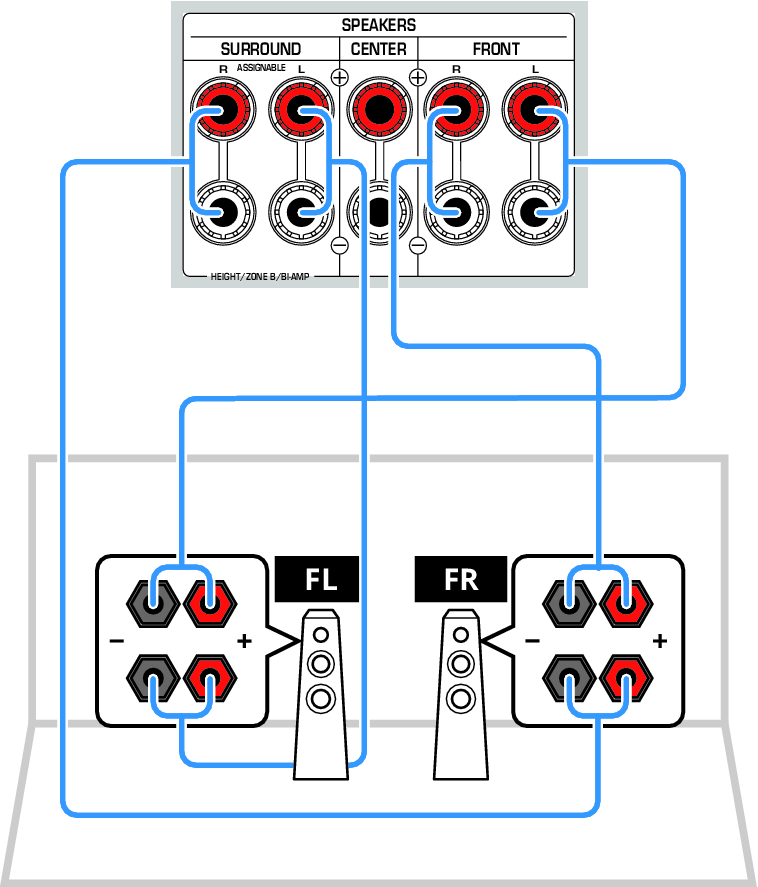
Connect front speakers that support bi-amping.
When the bi-amp function is enabled, two amplifiers are assigned to each of the front left and right speakers. By driving the high and low frequency ranges with separate amplifiers, clearer and more dynamic sound quality can be achieved.
To enable the bi-amp function, you must change the settings.
NOTICE
- Before making bi-amp connections, be sure to remove the metal jumpers (or cables) that link the high-frequency and low-frequency terminals on the speaker side. If not using bi-amp connections, be sure the jumpers (or cables) are installed when connecting the speaker cables. For details, refer to the user’s manual for your speakers.
NOTE
- The following connections cannot be used at the same time:
- Surround speaker
- Height speakers
- ZoneB speakers
- Bi-amp connections
 RX300A