


Charging the charging case
Charge the charging case.
Make sure to use the USB power cable that was included with this product. Also, when using a USB power adaptor, be sure that the adaptor is compatible with 5 V DC (at least 0.5 A) commercially available power output.
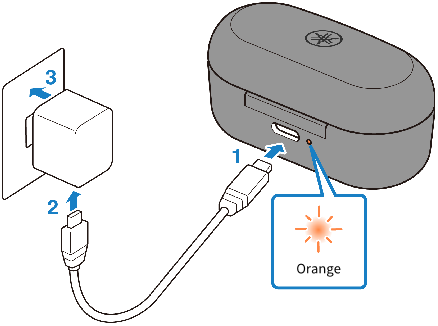
- Plug the USB power cable into the charging case.
- Plug the USB power cable into the USB power adaptor.
- Plug the USB power adaptor into the power outlet.
- Charging will begin.
While the case is charging, the indicator flashes as shown below according to the charging status.
- Flashes three times: plenty of charge remaining
- Flashes two times: moderate charge remaining
- Flashes one time: small amount of charge remaining
When charging is completed, the indicator light will turn off.
NOTE
- You can also charge the earphones while the charging case is charging. In this case, the indicator on the charging case will turn off.
- You may not be able to charge if you use a USB power cable other than the one included with this product.
- You may charge from the USB port on your computer instead of using a USB power adaptor.
- This product’s power will turn off during charging. You will not be able to operate or play music at this time.
NOTICE
- When charging this product inside of China, be sure to use a USB power adaptor that is approved by CCC.
 TW-E3A