


Restoring this product to factory defaults (Initialize / Reset)
This will restore all settings of this product to their factory defaults.
- Turn off the power after removing the earphones from their charging case.
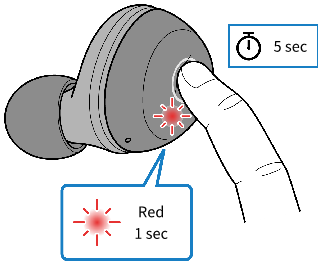
- Keep pressing the function key on each earphone (L, R) until their indicators light up red. You will hear the "Power Off" audio message in the earphones.
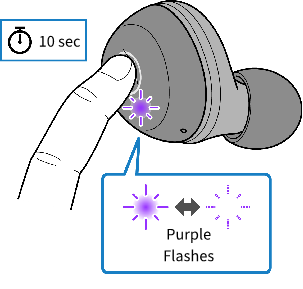
- Hold down the function key on earphone (R) for about 10 seconds.
- and the indicator flashes as shown below.
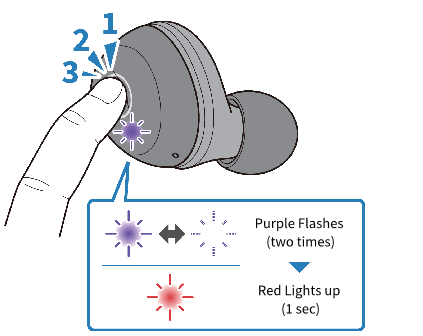
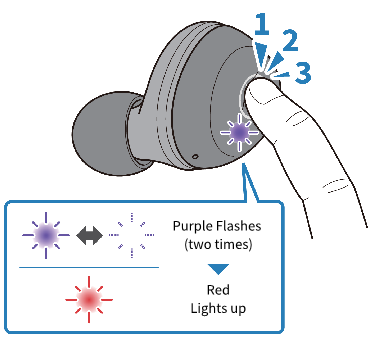
- Once the indicator starts flashing, press the function key on earphone (R) three times within 10 seconds.
- The indicator flashes as shown below, and the power will turn off. You will hear the "Power Off" audio message in the earphones. If the indicator does not stop flashing red, go back and retry the previous step.
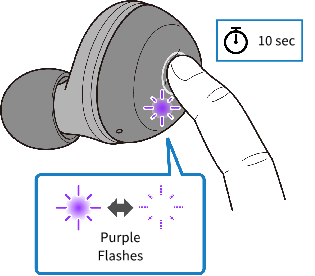
- Hold down the function key on earphone (L) for about 10 seconds.
- and the indicator flashes as shown below.
- Once the indicator starts flashing, press the function key on earphone (L) three times within 10 seconds.
- The indicator flashes as shown below, and the power will turn off. You will hear the "Power Off" audio message in the earphones. If the indicator does not stop flashing red, go back and retry the previous step.
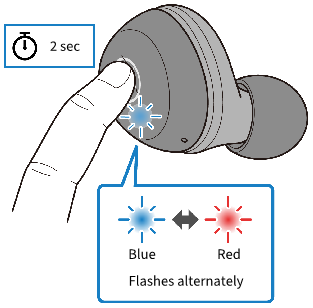
- Hold down the function key on earphone (R) for two seconds. The power will turn on.
- Take your finger off the key once the indicator lights up.
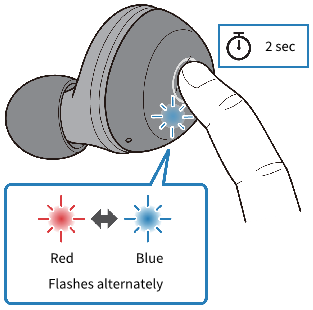
- Hold down the function key on earphone (L) for two seconds within 10 seconds of doing the previous step. The power will turn on.
- Take your finger off the key once the indicator flashes.
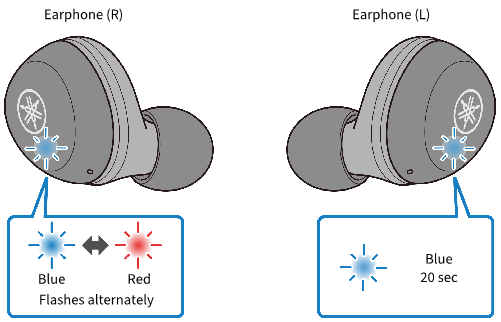
- If after several seconds the indicator displays as shown below, initialization was successful. If the indicators are not displaying as shown, try initializing once more from step 1.
 TW-E3A