


Connecting to an iPhone/iPad
This explains what to do to power this unit, up through connecting to an iPhone/iPad. An external power supply is required to connect to an iPhone/iPad.
What you need
- USB power adapter or USB mobile battery (at least 5 V, 1 A)
- Apple Lightning-USB3 Camera Adapter (when using an iPhone/iPad with a Lightning connector)
- USB-C charging cable included with the iPad, or a commercially available USB-C to USB-C cable (when using an iPad with USB-C connector)
NOTE
- When using this product for streaming or otherwise using it for long periods of time, have a power supply on hand to power your iPhone/iPad.
- For a list of compatible operating systems, see the following Yamaha website.
AG03MK2: https://www.yamaha.com/2/ag03mk2/
AG06MK2: https://www.yamaha.com/2/ag06mk2/
Connecting
- Make sure that the volume on this product and on the connected device is turned all the way down.
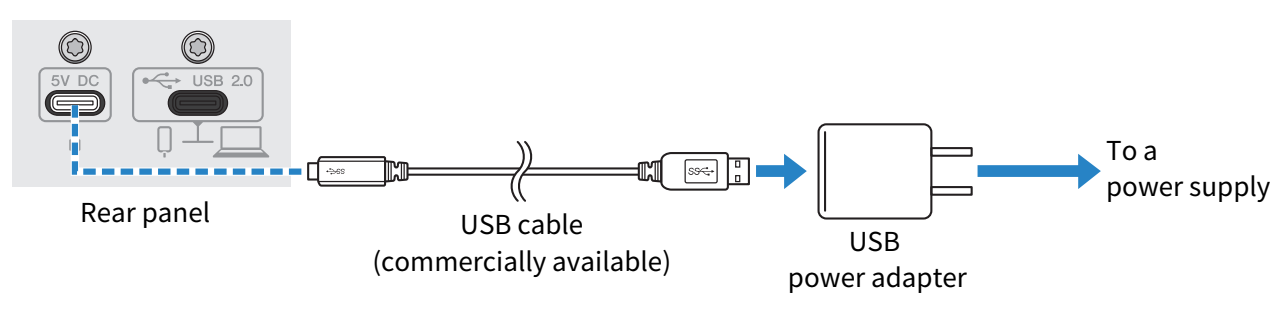
- Connect a commercially-available USB power adapter, USB mobile battery or similar device to the [5V DC IN] USB port on the rear of this unit.
- Turn the [z] (standby/on) switch on.
- Check whether the LED of the [z] (standby/on) switch on this product is lit.
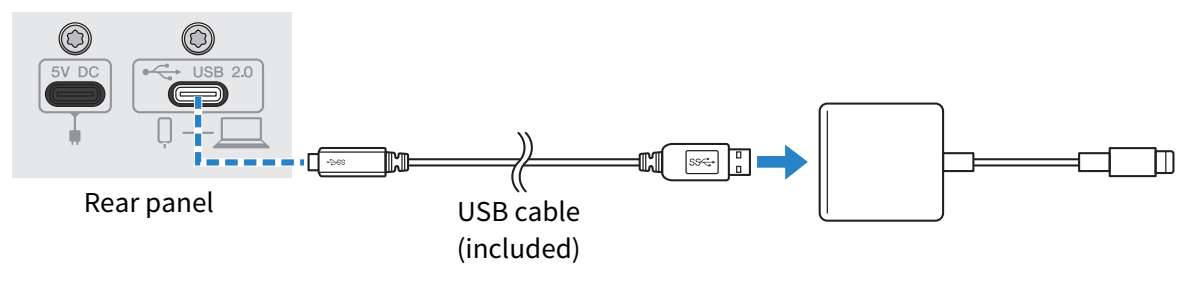
- Connect this product to an Apple Lightning to USB 3 Camera Adapter using the included USB cable.
NOTE
- If you’re using an iPad that has a USB-C connector, use the Apple USB-C Digital AV Multiport Adapter. You can also use the USB-C charging cable included with the iPad to connect directly to this product. However, the amount of time you can use the iPad will be limited by how much battery charge remains.
- Connect the Apple Lightning cable to the iPhone/iPad.
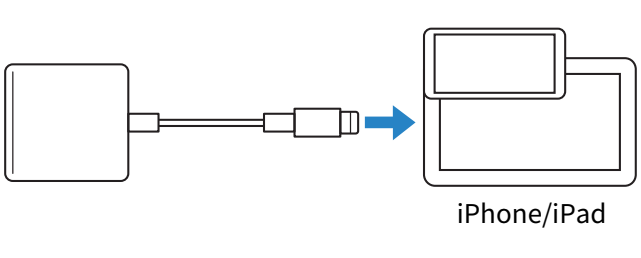
- This product is automatically recognized by the iPhone/iPad once connected.
- There is no need to configure any settings on the iPhone/iPad.
 AG03MK2 AG06MK2