


PREFERENCE screen
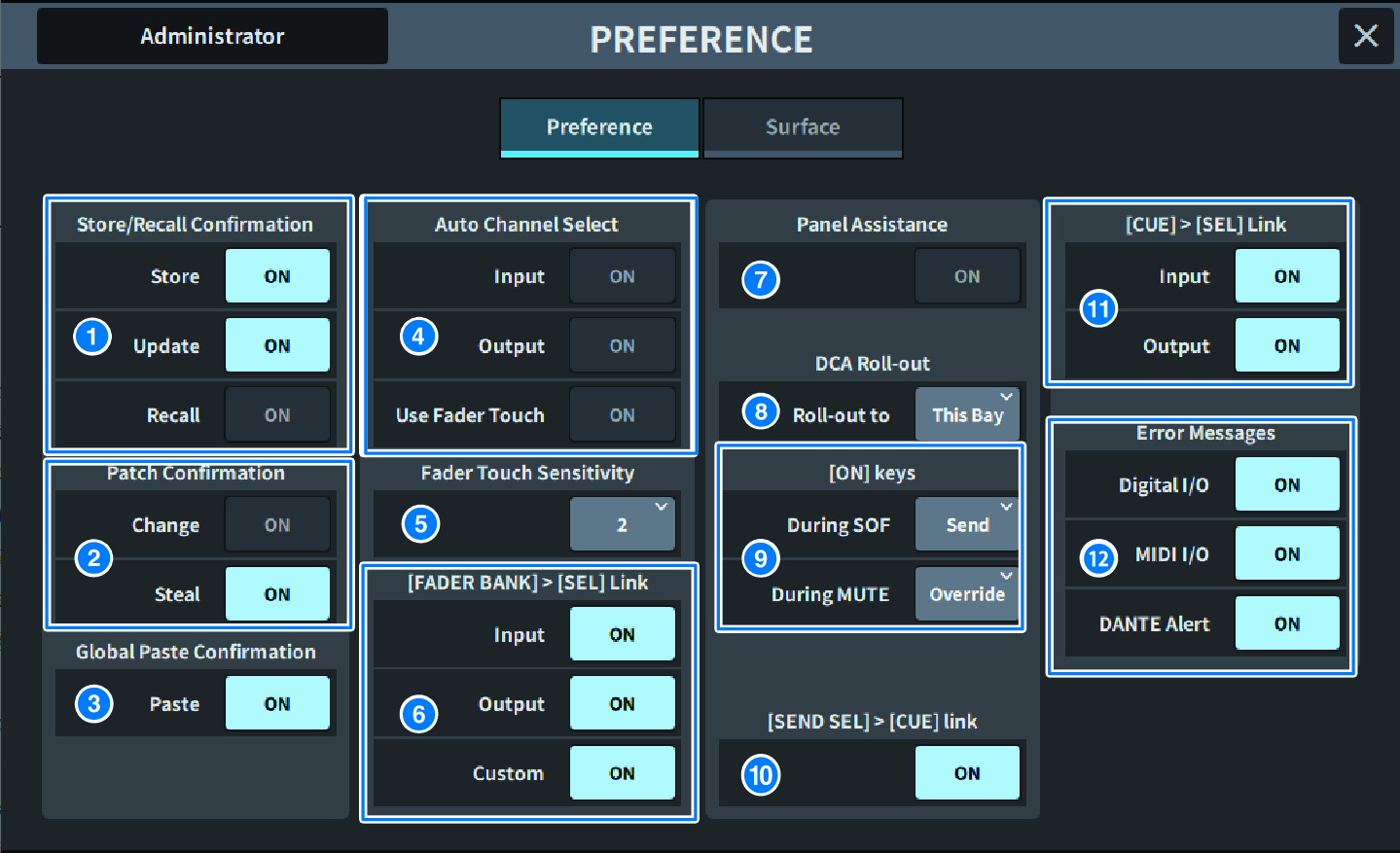
a | Store/Recall Confirmation Allows you to turn on/off options related to scene store/update/recall operations. When this is on, a confirmation message is displayed when you perform a Store, Update, or Recall operation. |
b | Patch Confirmation Allows you to turn on/off options related to patch operations.
|
c | Global Paste When this is on, a confirmation message is displayed when you perform a global paste. |
d | Auto Channel Select Sets whether a channel will be selected when the [ON] key or fader for the channel is operated.
|
e | Fader Touch Sensitivity The Touch sensitivity can be adjusted in five steps. Higher values provide greater touch sensitivity. |
f | [FADER BANK] > [SEL] Link Specifies whether channel selection will be linked with fader bank selection. You can set this parameter separately for INPUT (input channels), OUTPUT (output channels), and CUSTOM (Custom fader bank). If this button is on, when you select the corresponding fader bank, the channels in that bank that was selected most recently will be selected, and its [SEL] key will illuminate. |
g | Panel Assistance If the Panel parameter in the Brightness field is set to less than 50%, when this is set to on, all the LED indicators on the panel will be dimmed. |
h | DCA Roll-out Roll-out to Sets the Bay for DCA Roll-out. |
i | [ON] keys During SOF Selects the operation of the [ON] keys during SENDS ON FADER mode.
During MUTE Selects the operation of the [ON] keys while muted.
|
j | [SEND SEL]>[CUE] Link When in SENDS ON FADER mode, this turns on/off the CUE state follow operation when the destination bus is switched. |
k | [CUE]>[SEL] Link Sets whether channel selection will be linked with cue operations. |
l | Error Messages
|
 DM7 Series