


DM7 CONTROL SETUP Screen
Make DM7 Control settings.
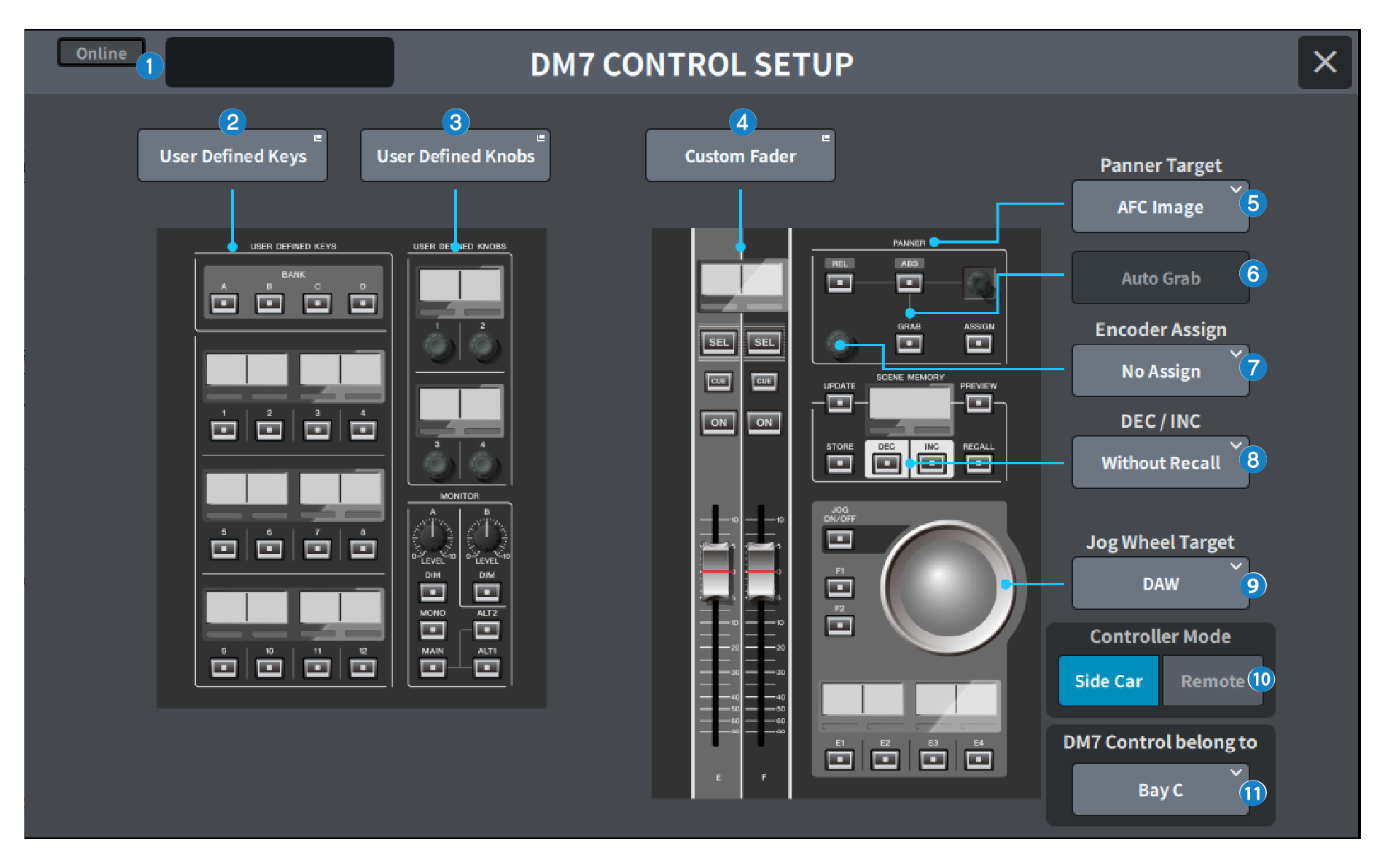
a | Status display |
Connection status indicator Displays the connection status of DM7 Control.
|


Power status warning indicator Appears when there is a disabled DM7 Control power supply.
|


Status display Displays the status of DM7 Control. Displays the update progress when DM7 Control is in update mode. |
b | User Defined Keys button Press this button to display the USER DEFINED KEYS screen. |
c | User Defined Knobs button Press this button to display the USER DEFINED KNOBS screen. |
d | Custom Fader button Press this button to display the CUSTOM FADER screen. |
e | Panner Target selection button Select the Panner operation target.
|
f | Auto Grab button Specifies whether to automatically grab when approaching the actual parameter when operating with the Panner. |
Value | Explanation | Default |
Off | No Auto Grab | |
On | Auto Grab | 〇 |
g | Encoder Assign selection button Select the Encoder operation target. The selection changes depending on which Panner Target selection button is selected. Sets the Encoder Assign to the corresponding default value when the Panner Target changes. If Panner Target is AFC Image
If Panner Target is 5.1 Surround
|
h | DEC/INC selection button Select the behavior when the DEC button and INC button are operated.
|
i | Jog Wheel Target selection button Select the Jog Wheel operation target.
|
j | Controller Mode selection button Select the purpose of DM7 Control. |
Explanation | Default | |
Side car | Expand and use the DM7 main unit controls | 〇 |
Remote | Use separated from the DM7 main unit |
In Remote mode, the following DM7 main unit interlocking and linked operations are inhibited.
- Confirmation display on the DM7 main unit during SCENE MEMORY UPDATE, and RECALL
- Selected Scene changes on the DM7 main unit by Scene List operation
- Touch and Turn operations with Jog Wheel Target
- Brightness setting
k | DM7 Control belongs to selection button (DM7 only) Select the target Bay for [SEL], Scene List, etc.
NOTE
|
 DM7 Series