


Scene List screen
This screen is used to manage scenes with saved mixer settings.
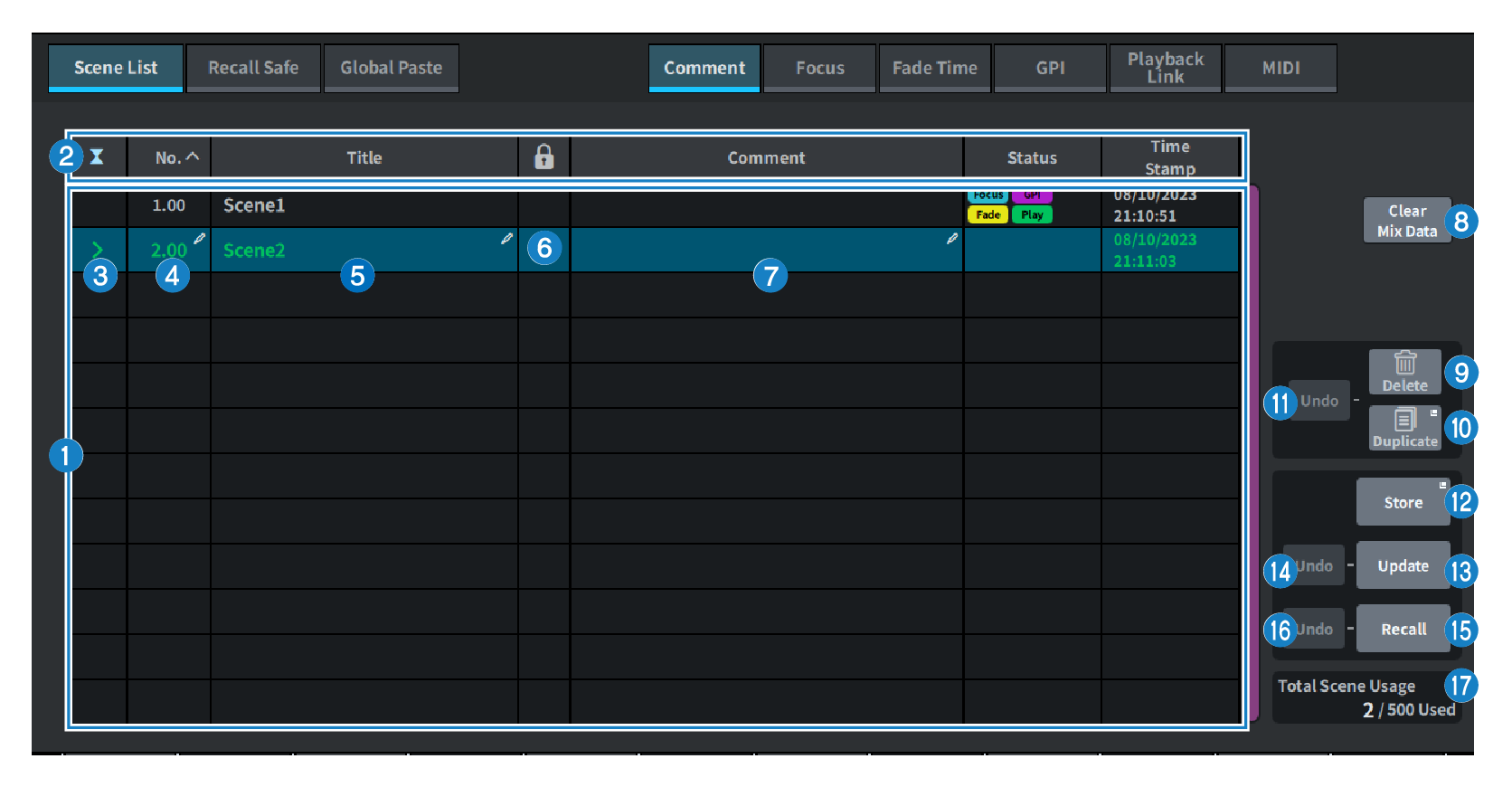
a | Scene list This area displays information about the scenes stored in memory. |
b | Sort buttons The list will be sorted as follows, according to the column header you pressed.
NOTE
|
c | Current scene select button Press this button to select the scene that was recalled or stored most recently. The current scene is highlighted in green in the list. |
d | Scene number Displays the current scene number. |
e | Scene title button Displays the title assigned to the scene. Press to display the keyboard to edit the title. The maximum number of characters in a scene title is 16. |
f | Protect (lock) symbol Displays the write protect enabled/disabled status. Press to write-protect the scene, and the button lights up. Press it again to cancel write protection. |
g | Selected scene The scene highlighted in blue in the list is the currently selected scene. |
h | Clear Mix Data button Press this button to initialize the current scene. |
i | Delete button Press this button to erase the selected scene. |
j | Duplicate button Press this button to duplicate the selected scene. |
k | Delete Duplicate Undo button Undoes the delete and duplicated operations. This function is valid only immediately after you perform these actions. |
l | Store button Creates a new stores for the current mix data. Press to display the SCENE Store screen used to name and save the scene. |
m | Update button Updates scene data by overwriting the scene (that has been recalled or stored most recently) with the current mix data. |
n | Update Undo button Undoes the store operation. This is valid only if the immediately previous action was an overwrite save. |
o | Recall button Press this button to recall the currently-selected scene. |
p | Recall Undo button Undoes the recall operation. This is valid only if the immediately previous action was a recall operation. |
q | Total Scene Usage Display Displays the state of scene resource usage. The maximum number of scene data is 500. |
 DM7 Series