


12ch Gain screen
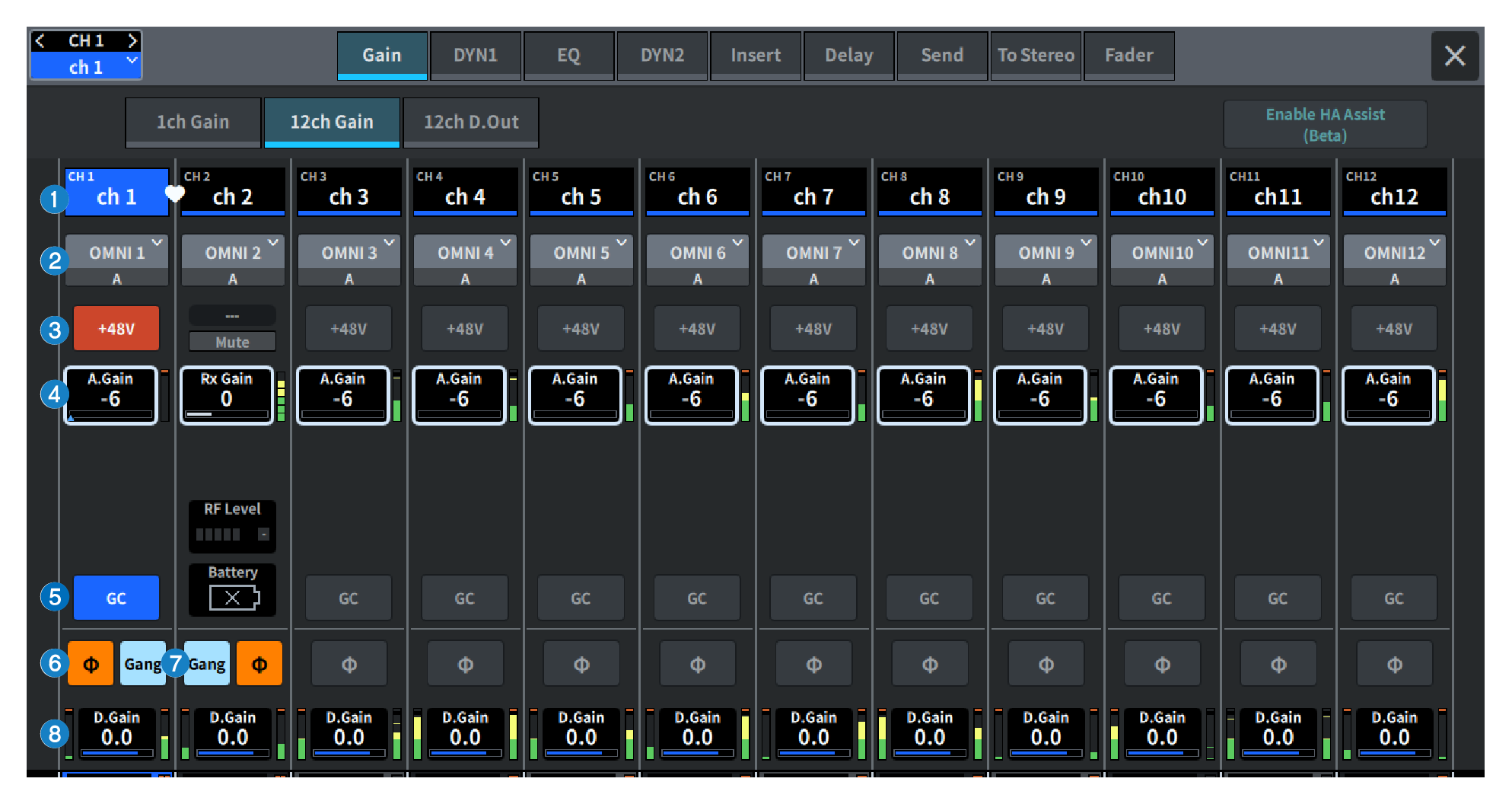
The screen contains the following items.
a | Channel select button Displays the channels. Press this button to select the channel. The name and color of the current channel are displayed in the button. |
b | Patch information Displays the channel’s patch status. |
c | +48V button Switches phantom power (+48V) on/off. |
d | A. Gain This displays the HA analog gain setting value. When the screen is pressed to select, the value is adjusted by sliding vertically or horizontally or using the [TOUCH AND TURN] knob. If gain compensation is on, an indicator is displayed showing the analog gain position at the time that gain compensation was turned on. |
e | GC (GAIN COMPENSATION) button Switches the gain compensation on/off for each channel. |
f | Phase button Switches the phase of the input signal. |
g | GANG button This is display only for stereo. If this button is on, the differences in LR analog gain will be maintained and linked. The same applies to digital gain. |
h | D. Gain Displays the digital gain setting. When the screen is pressed to select, the value is adjusted by sliding vertically or horizontally or using the [TOUCH AND TURN] knob. |
 DM7 Series