


Connecting a TV
Use an HDMI cable to connect the TV to this product. This allows video from this product to be displayed on the TV and TV audio to be played back through this product.
- Check the location of the TV’s eARC/ARC HDMI port.

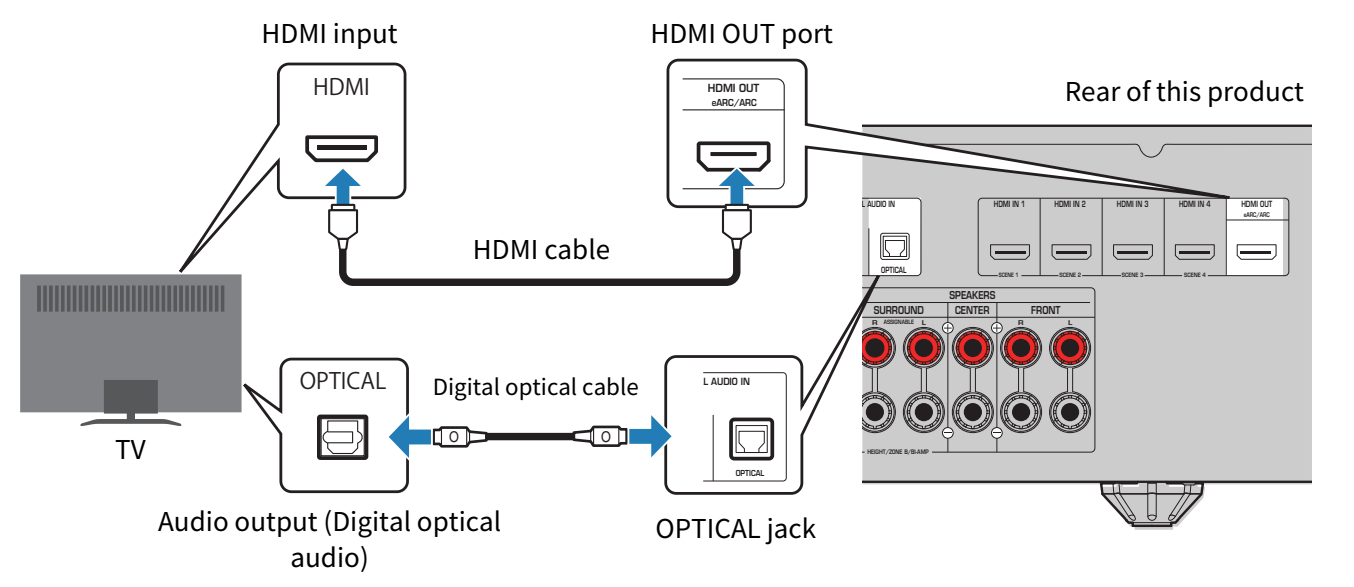
- If the TV does not have an eARC/ARC-compatible HDMI port, use a digital optical cable for audio playback.
- For the connection method, refer to “Connecting with a digital optical cable” below.
- Use an HDMI cable to connect the HDMI OUT port of this product to the TV’s eARC/ARC HDMI port.
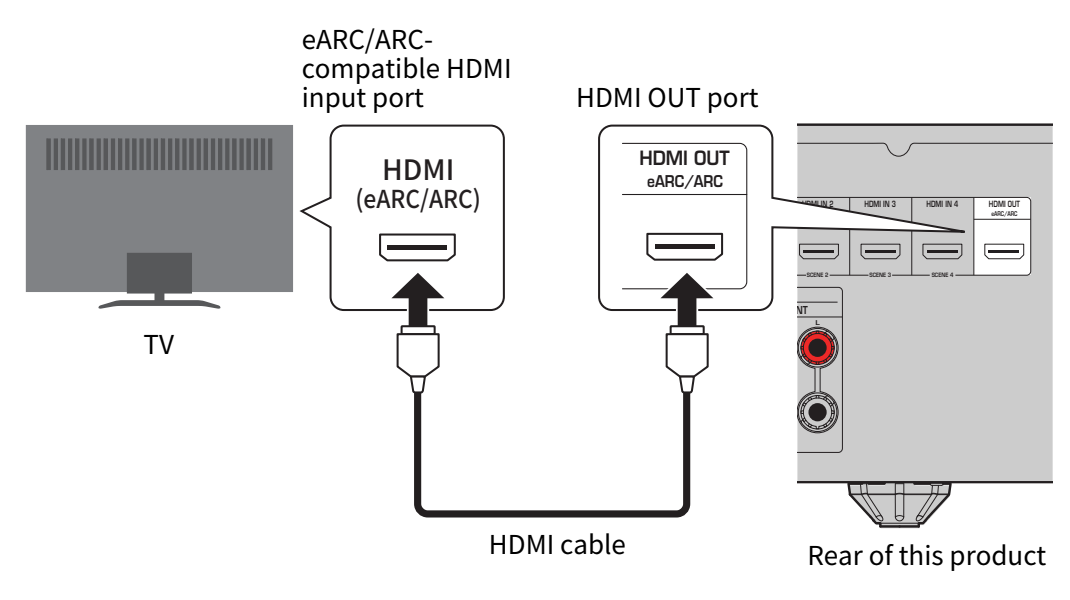
- If there is no eARC/ARC HDMI port, connect to an available HDMI port.
- Make a note of the name of the HDMI port on the TV that you connected.
- You will use this when selecting the TV input later.
What are eARC and ARC?
- ARC is an abbreviation for Audio Return Channel. By connecting the ARC-compatible HDMI input port on the TV to the ARC-compatible HDMI output port on an AV device (such as an AV Receiver or a Sound Bar) via an HDMI cable, audio from the TV can be played on the AV device without using an optical cable.
- eARC is an abbreviation for Enhanced Audio Return Channel. It is an enhanced version of ARC and allows transmission of uncompressed 5.1-channel and object-based audio such as Dolby Atmos from the TV.
NOTE
- Use a 19-pin HDMI cable with the HDMI logo. To prevent signal quality degradation, we recommend using the shortest possible cable.
- To enjoy playback of 8K video, use an Ultra High Speed HDMI cable or an Ethernet-compatible Ultra High Speed HDMI cable.
- To enjoy playback of 3D and 4K Ultra HD video, use a Premium High Speed HDMI cable or an Ethernet-compatible Premium High-Speed HDMI cable.
- When using eARC or ARC, use an Ethernet-compatible High Speed HDMI cable or another HDMI cable that supports eARC/ARC.
- You may have to change settings on the TV. Please also refer to the user's manual for your TV.
- When using a projector, connect to the projector’s HDMI input port.
Connecting with a digital optical cable
If the TV does not support eARC or ARC, also connect a digital optical cable.
NOTE
Depending on the TV’s audio output jacks, you may also connect via digital coaxial or analog stereo instead of digital optical. In that case, change the settings in SETTINGS menu > “TV Audio Input”.
Next step
 RX300A