


Part names of the sound bar (front/top)
This section describes the part names and functions of the front/top of the sound bar.
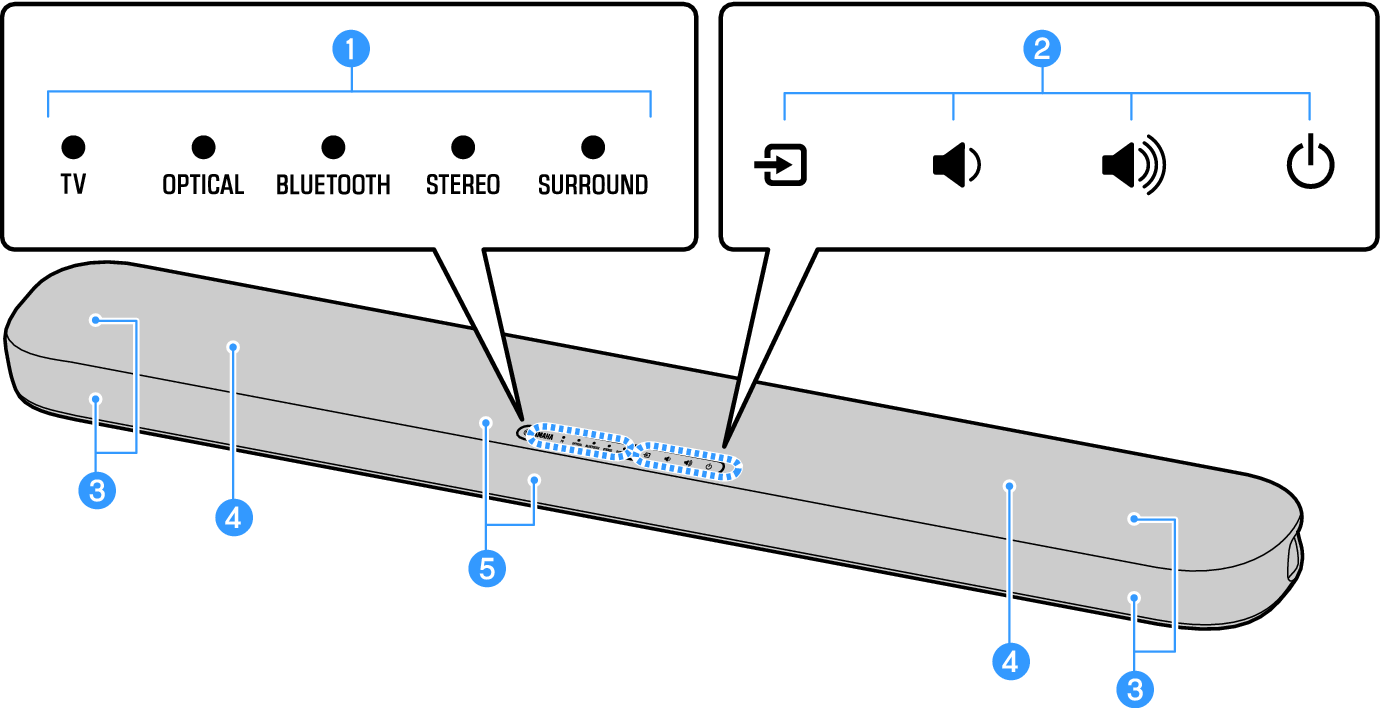
a | Indicators The indicators on the top panel flash or glow to show the operation and setting status. During normal playback, the setting status is indicated as follows: | |
TV / OPTICAL / BLUETOOTH: Selected input source | ||
STEREO: Stereo playback | ||
SURROUND: Surround playback | ||
NOTE
|

c | Speakers |
d | Built-in subwoofers |
e | Remote control sensors |
NOTE
- To prevent unintended operation, do not place anything on the controls of the sound bar.
Enabling the Child Lock function prevents accidental operation.
- The brightness of the indicators can be adjusted by pressing DIM.
 SR-B20A