


Playing back audio on this product
You can operate this product using the respective keys during playback as follows.
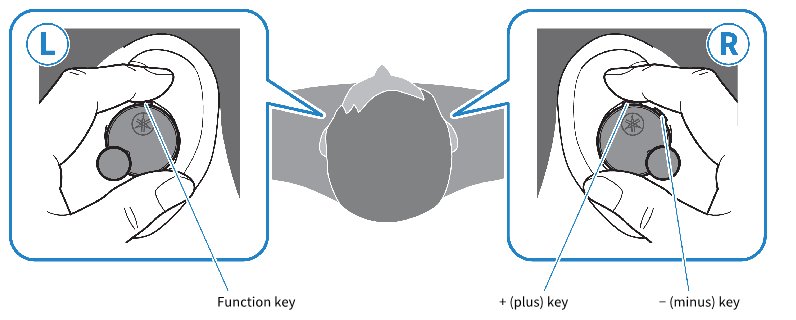
Volume controls
- Turn the volume up
- Press the + (plus) key.
- Turn the volume down
- Press the − (minus) key.
Playing back audio
- Pause/play
- Press the function key.
- Skip to the next track
- Press the + (plus) key twice.
- Go back to the beginning of the track (while in the middle of the track), or back to the previous track (when at the beginning of a track)
- Press the − (minus) key twice.
- The operation may differ, depending on the Bluetooth device or app you use.
In-Ear Detection
- Pause or restart playback
- When you remove either earbud (L) or (R), its built-in sensor activates, pausing the audio playback automatically. The audio automatically starts again when you put the earbuds back on.
GAMING MODE
This function also makes the audio and video sound more in sync, which is useful when you are watching a video or playing a game.
- Press the − (minus) key three times.
- Press the key three times to toggle between enable and disable.
- GAMING MODE → OFF → back to GAMING MODE
NOTE
- In regard to In-Ear Detection, please observe the following.
- The default setting is “ON.”
- Before putting the earbuds on, turn down the volume on the connecting device.
- In-Ear Detection only supports playback. This feature does not work when making phone calls.
- Playback will stop when either or both earbuds are removed.
- In-Ear Detection may not work correctly if the earbud is not placed correctly in your ear.
- If the detection feature is on, auto power off will not operate.
- When you turn the earbuds off, the GAMING MODE setting changes to OFF. To turn the setting on again, either turn on the earbuds manually or use the Headphone Control app to change the setting to ON.
- You can also set the GAMING MODE features using the Headphone Control app. The settings are as follows.
- ON: enables GAMING MODE
- OFF (default setting): disables GAMING MODE
- When connecting to a device (such as a smartphone) on which the volume can be adjusted, you can also adjust the volume using that device.
- To select a song for playback, operate the connected device.
 TW-E7B