


App settings
This explains the settings and items you can check using the Headphone Control app.
[Search tag] #Q03 App
NOTE
- The app screen and items may differ, depending on your product.
Main screen
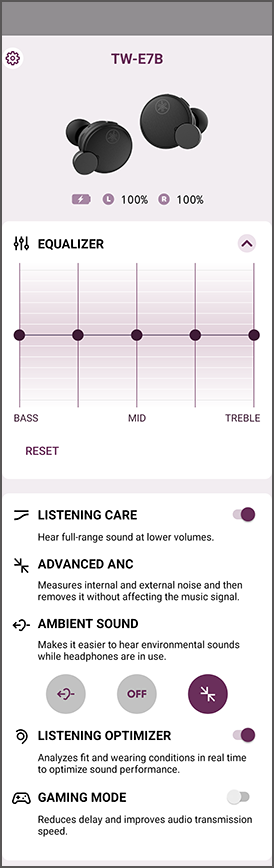
- EQUALIZER
- This is a five-band graphic equalizer that lets you create your own custom sound settings.
- Gain settings for each equalizer
- 0 dB (default setting)
- LISTENING CARE -Advanced
- When LISTENING CARE -Advanced is enabled, this product automatically adjusts the sound quality according to the playback volume. This feature adjusts the frequency balance, offering rich sound quality playback even at a low volume.
- Settings
- ON (default setting): enables LISTENING CARE -Advanced
- OFF: disables LISTENING CARE -Advanced
- ADVANCED ANC
- This feature reduces only the external noise while maintaining playback sound quality, eliminating the need to turn the volume up too high.
- AMBIENT SOUND
- This function makes it easier to hear the sounds around you, such as announcements made on public transportation, the sounds of passing cars and so on.
- Settings
- AMBIENT SOUND: enables AMBIENT SOUND
- ADVANCED ANC: enables ADVANCED ANC
- OFF (default setting): AMBIENT SOUND and ADVANCED ANC are both disabled (normal playback mode)
- LISTENING OPTIMIZER
- When you enable the LISTENING OPTIMIZER, the audio is analyzed in real time and the sound quality is adjusted to best match how this product fits on your ears and your ear shape.
- Settings
- ON (default setting): enables LISTENING OPTIMIZER
- OFF: disables LISTENING OPTIMIZER
- GAMING MODE
- This function also makes the audio and video sound more in sync, which is useful when you are watching a video or playing a game.
- Settings
- ON: enables GAMING MODE
- OFF (default setting): disables GAMING MODE
NOTE
- The AMBIENT SOUND does not guarantee that you will be able to hear everything. You may be unable to hear ambient sounds if you’ve turned up the volume of the audio, or in certain situations.
- When using GAMING MODE, the video/audio latency may change or the sound quality and connection stability may degrade, depending on the usage environment and how you wear the product.
Settings screen
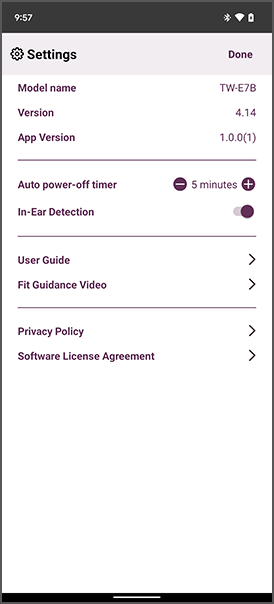
- Auto power-off timer
- Sets the time it takes for the power to turn off after Bluetooth has been disconnected.
- Settings
- OFF (default setting)
- 5 minutes
- 30 minutes
- 1 hour
- 3 hours
- In-Ear Detection
- When you remove either earbud (L) or (R), this feature pauses the audio playback automatically. The audio automatically starts again when you put the earbuds back on.
- Settings
- ON (default setting): enables In-Ear Detection
- OFF: disables In-Ear Detection
- Check for firmware update
- Checks whether new firmware has been released, and performs updates.
- User Guide
- Accesses the User Guide
 TW-E7B