
Part names of the remote control

This section describes the part names and functions of the remote control.
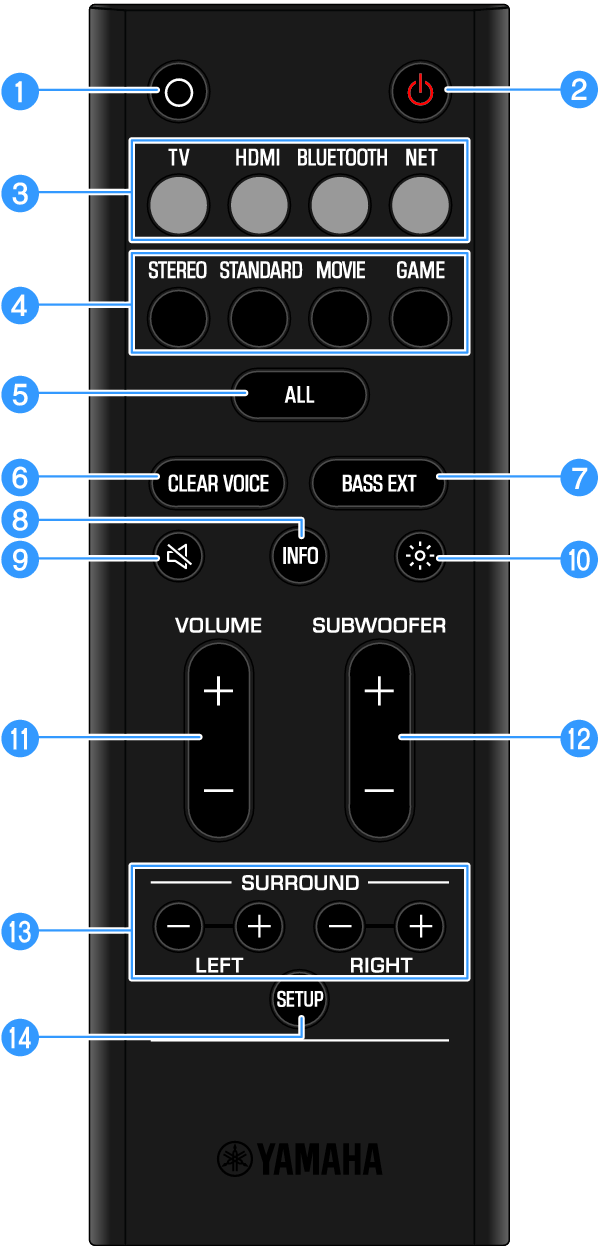
 

a

) (Action) button

Wake Alexa ().

b

z (Power) button

Turn the sound bar on and off ().

c

Input source buttons

Select an audio input source ().

  • TV button: Audio from a TV
  • HDMI button: Audio from a device connected to the HDMI input jack
  • BLUETOOTH button: Audio from a Bluetooth device
  • NET button: Audio from streaming services

d

Sound mode buttons

Switch to your preferred sound mode ().

  • STEREO
  • STANDARD
  • MOVIE
  • GAME

e

ALL button

Enable or disable the ALL mode.

For details, see the following TRUE X SURROUND Connection and Operation Guide.
https://manual.yamaha.com/av/truexsur/

f

CLEAR VOICE button

Enable or disable the Clear Voice function ().

g

BASS EXT button

Enable or disable the Bass Extension function ().

h

INFO button

Check information such as the type of audio signal being played and the settings for the sound bar’s functions ().

i

| (Mute) button

Mute the audio output (). Press this button again, or press VOLUME (+/-) to unmute.

j

# (Brightness) button

Switch the brightness of the indicators of the sound bar ().

k

VOLUME (+/-) button

Adjust the volume of the sound bar ().

l

SUBWOOFER (+/-) button

Adjust the volume of the subwoofer ().

m

SURROUND L/R (+/-) buttons

Adjust the volume of each surround speaker when wireless speakers are used as surround speakers for the sound bar.

For details, see the following TRUE X SURROUND Connection and Operation Guide.
https://manual.yamaha.com/av/truexsur/

n

SETUP button

  • Used when connecting to the TRUE X SUB 100A (SW-X100A) dedicated subwoofer (sold separately) ().
  • Used when registering wireless speakers compatible with TRUE X SURROUND (sold separately) as surround speakers ().
NOTE
  • Use the remote control within the range shown in the following illustration: