
Introduction
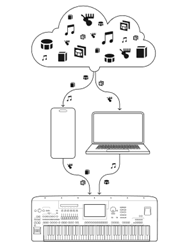
EXPANSION EXPLORER (this app) enables you to intuitively install expansion contents (Voices, Styles, Multi Pad content, Songs) to compatible Yamaha arranger workstation keyboards. This allows you to play in a wider variety of genres and get greater enjoyment from your instrument, by using additional expansion content provided by Yamaha.
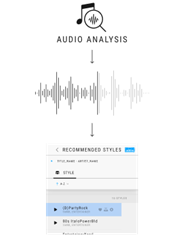
You can also search for content that matches the song you want to play from all the content (including preset content) in the connected instrument.
NOTICE: About Conflict with the Yamaha Expansion Manager App
The data installed on the instrument from EXPANSION EXPLORER and from Yamaha Expansion Manager cannot coexist. Only data installed later from one of the apps will be valid.
• If you perform a new installation using the Yamaha Expansion Manager, any expansion content installed from this app will be deleted from the instrument.
• If you perform a new installation using this app, any Expansion Packs installed using the Yamaha Expansion Manager will be deleted from the instrument.
What you can do with this app
• Search for and listen to Yamaha's expansion contents (Voices/Styles/Multi Pads/Songs).
• Search for and listen to contents (preset) of your instrument connected to this app.
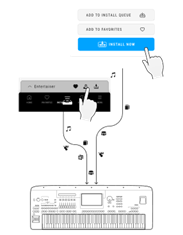
• Install expansion contents to your instrument, with a minimum of one file. It is not necessary to install an entire pack at one time; also, additional content can be installed later.
• Analyze an audio file to find suitable content (preset and expansion) for recreating that song by playing the keyboard.
• Import and install your original or third-party made expansion content (Voice/Style/Multi Pad/Song) to the instrument. (Windows/Mac version only.)
• Check the remaining capacity of the instrument.
• Check and edit the content of the Registration Memory Bank files and Playlist files in the connected instrument.
NOTE
Some instruments come with pre-installed Expansion content. This content will be removed when you install the content from EXPANSION EXPLORER for the first time.
However, you can reinstall parts of the pre-installed content as you need, using EXPANSION EXPLORER.
What you CANNOT do with this app
The following cannot be done with this app. In these cases, please use Yamaha Expansion Manager.
• Create your original expansion content.
@ 各部の名称と機能