
Displays (Detail)
EXPLORE
This display lets you search for preset content and available expansion content for your instrument.

|



 For the computer/iPad version, this turns the pop-up window on/off. (This window is the same as the EXPLORE display on the smart device version.)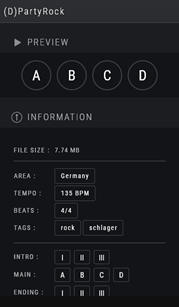

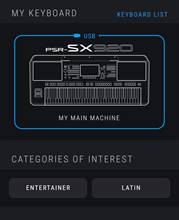
On the smart device version of the EXPLORE display, the following are available:
• MY KEYBOARD: For checking the connection status with the instrument, and opening the KEYBOARD LIST display • CATEGORIES OF INTEREST: For filtering contents by selected category • AREAS OF INTEREST: For filtering contents by selected area |
While a connection to the instrument is active, a blue line surrounds the instrument illustration, and the connection type is shown.
Search results/detailed information
You can preview each content, register it as a favorite, and install/remove it from the instrument.
For the computer/iPad version, these are displayed on the EXPLORE screen.
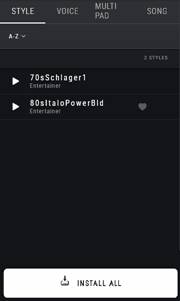
Search results
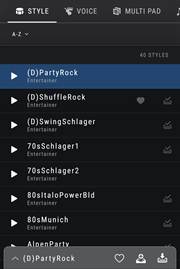
Selecting a content name calls up the detailed information display.
• Smart Device version: A menu for calling up the display or other operations is shown at the bottom.
• Computer/iPad version: The detailed information display is shown directly on the right.
|
 Plays the selected preview
 Calls up the detailed information display
 For adding/removing content to/from the FAVORITES list
 For adding/removing content to/from the INSTALL QUEUE
 Immediately installs/removes the content on your instrument
 Enable the content on the instrument (for preset content only)
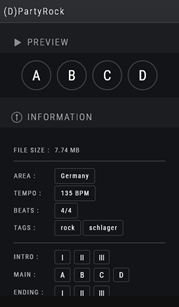
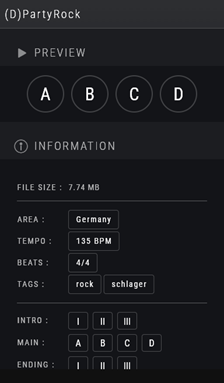
Detailed information

(for preset content only)
|
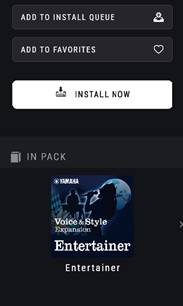
 For playing each preview
 Indicates content information (indication only)
 For adding/removing content to/from the INSTALL QUEUE
 For adding/removing content to/from the FAVORITES list
 Immediately installs/removes the content on your instrument
 Enable the content on the instrument
  Displays information about the pack that contains the content
ADVANCED SEARCH
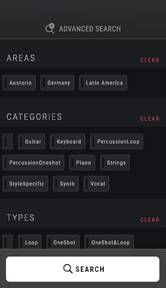
You can add various conditions to refine your search.
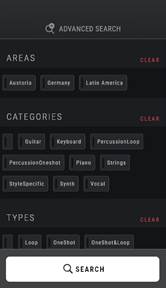
Each element (AREAS, CATEGORIES, etc.): Specify the filtering conditions.
- FAVORITES: Already added to FAVORITES - INSTALLED: Already installed to the instrument
NOTE If you search by just entering the text input field instead of tapping/clicking [SEARCH] above, the search will not apply the advanced conditions, even if the advanced search display is shown. |
 Set whether the content that meets the condition is shown in results or not.
 Perform a search using keywords and specified conditions.
RECOMMENDED STYLE
This function analyzes an audio file and lists expansion Styles suitable for playing that music.
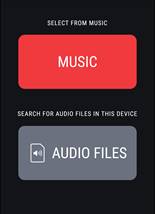
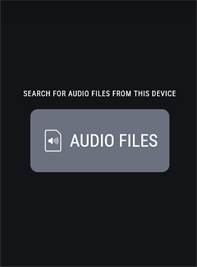
For selecting an audio file from the "Music Library" of this iPhone/iPad and having it analyzed.
For selecting an audio file on your device and having it analyzed. Supported formats: • WAV, MP3, AAC (Android/iPhone/iPad/Mac/Windows) |
 (iPhone/iPad version only)
 (common to all versions)
After tapping/clicking the icon and selecting an audio file, analysis starts.
When the analysis is complete, the search results display is shown with a list of recommended content. You can use it in the same way as regular search results.
FAVORITES
You can easily access favorite content that you intend to repeatedly use, by adding them to this list from the search results display.
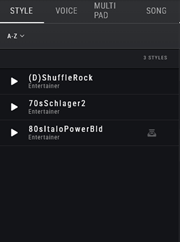
INSTALL QUEUE
This allows you to collect the content added to the INSTALL QUEUE list from the search results display and install it to your instrument all at once.
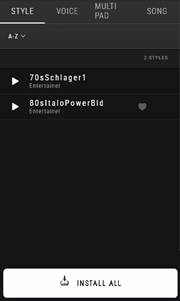
Install all the content in the list to your instrument at once. NOTE When the installation is complete, the INSTALL QUEUE list becomes empty. |

HISTORY
You can check your installation history and preview play history.
Also, you can delete the installed content from the instrument.
Delete (uninstall) the content from the instrument. |

IMPORT
(Only for Windows/Mac versions)
You can import and install your original or third-party expansion content (Voice/Style/Multi Pad/Song) to the instrument. A wide variety of file types can be imported, including Expansion Packs (.ppf/.cpf), MIDI Songs (.mid), audio files (.wav/.mp3), Styles (.sty), Multi Pads (.pad), etc.
For a complete list of supported file types, click the  icon.
icon.
To import the desired file, click the  and select the desired file, or drag and drop the file into the app window. Then, select the imported content and install same as other expansion content.
|
 Call up the list of available file types which can be imported
 Call up the file select window for importing files
NOTE
If you import the same file multiple times, each import will be treated as a separate file.
HISTORY (IMPORT)
You can check your installation history of imported files.
Also, you can delete the installed content from the instrument.
Delete (uninstall) the content from the instrument. |

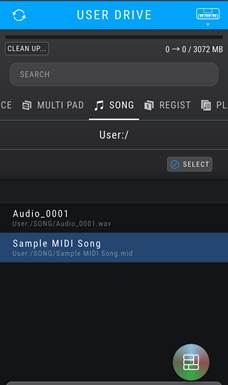
MANAGE (USER DRIVE)
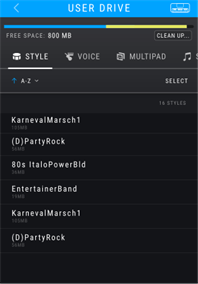
Shows the contents of the User drive of the connected instrument.
You can also view and remove expansion content that has already been installed.
Registration Bank files and Playlist files can be edited.
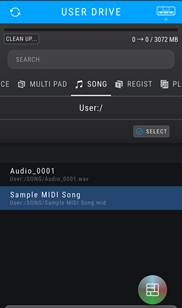
If you simply REMOVE a Voice, the waveform capacity for that Voice remains in use. This is unavoidable due to the way Voices work. However, by running CLEAN UP, you can remove unused waveforms from any Voice and maintain an optimum amount of free space for expansion Voices.
|
Editable content for Registration Bank and Playlist files: • Registration Bank: Bank name, memory name, memory order • Playlist: Playlist name, record name, record order |
 Removes the corresponding content from your instrument.
 Performs cleanup of the waveform memory.
 Enables the Registration Bank on the instrument (for Registration Banks only)
MENU
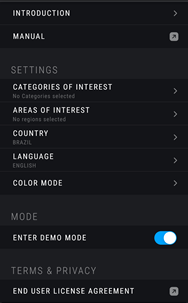
You can change various settings, view the instruction manual, view the license information and check the software and firmware versions.

INTRODUCTION | Calls up the initial setup sequence that runs when this app is launched for the first time. | |
MANUAL | Calls up the Owner’s Manual (this manual). | |
SETTINGS | CATEGORIES OF INTEREST | For setting categories which you want to display as a filter option on the EXPLORE display. |
AREAS OF INTEREST | For setting areas which you want to display as a filter option on the EXPLORE display. | |
COUNTRY | For setting your own country or region. This allows Yamaha to provide ideally appropriate expansion content for your region. | |
LANGUAGE | For setting the display language for this app. | |
COLOR MODE | Switches the color tone mode between dark and light. | |
RESET SETTINGS | Clear all app settings (history, favorites, keyboard list) and app cache. | |
MODE | ENTER DEMO MODE | Switches between normal mode and demo mode. |
TERMS & PRIVACY | END USER LICENSE AGREEMENT | Calls up the user license (web page) that you agreed to when you started using this app. |
PRIVACY | Calls up the privacy policy of this app (web page). You can also turn on/off whether to allow sending anonymous usage data to help improving this service from this item. | |
ABOUT | OPEN SOURCE LICENSE | Displays information about the software licenses used in this app. |
APP VERSION | Displays the version of this app. | |
FIRMWARE VERSION | Displays the firmware version of the currently connected instrument. |
Other displays
NOTIFICATION
Notifications from Yamaha are displayed.
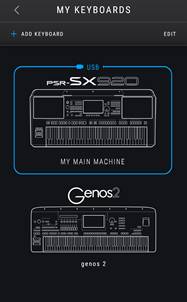
KEYBOARD LIST (MY KEYBOARDS)
Currently connected instrument and other registered ones are displayed.
You can switch instrument connection, delete registered keyboards, or add new one.
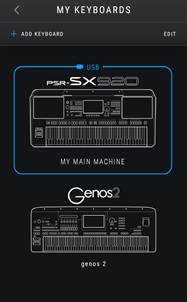
Instrument illustration: Switches to the connection for that instrument. |
 Add a new instrument.
 Calls up the list editing display where you can delete registered instruments.