

Playing Back MIDI Files including Songs Transferred from a Computer
For instruments other than the models listed below, refer to the Owner's Manual of your instrument to see how to play files transferred from a computer. (This function may not be available on certain models.)
YDP-C71/YDP-S52/YDP-S51/YDP-S34/YDP-163/YDP-162/YDP-143/YDP-142/CLP-725/CLP-625/CLP-525/YDP-164/YDP-144/YDP-S54
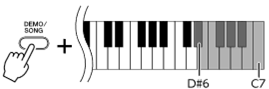
You can transfer up to 10 Song files from a computer to this instrument for playback. The transferred Songs are assigned to the D#6–C7 keys, letting you select and play them back.
NOTE
• The shapes of buttons may appear different from those on your instrument.
• For the functions assigned to the keys, refer to the Quick Operation Guide supplied with your instrument.
1. While holding down [DEMO/SONG], press one of the D#6–C7 keys to select a song to play back.
|
|
highest key |
● YDP-C71
Playback continues the sequence: any other Songs transferred from the computer, followed by Demo Songs and Preset Songs.
● YDP-S52/YDP-S51/YDP-S34/YDP-163/YDP-162/YDP-143/YDP-142/CLP-725/CLP-625/CLP-525/YDP-164/YDP-144/YDP-S54
Playback continues the sequence: any other Songs transferred from the computer.
To change the Song during playback:
Press [+ R] or [- L] to change to the next or previous Song.
2. Press [DEMO/SONG] or [PLAY] to stop playback.
■ Changing Playback Channels
If the Song data transferred from a computer includes Voices that are not available on the instrument, no sound may be produced, or the intended sound may not be produced correctly. In such cases, switching the playback channel as described below may make the playback sound more natural.
To set Playback Channels to “1+2”:
While holding down [DEMO/SONG] and [PIANO/VOICE] simultaneously, press the C7 key.
|
|
highest key |
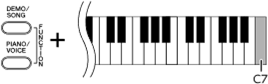
With this operation, the Song data of only channels 1 and 2 will be played back. When Voices incompatible with this instrument are assigned to Channels 3 – 16 and the Piano parts are assigned to the Channels 1 and 2, this operation results in the proper or expected sound.
To set Playback Channels to “All”:
While holding down [DEMO/SONG] and the [PIANO/VOICE] simultaneously, press the B6 key.
|
|
highest key |
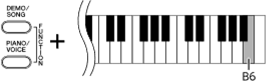
With this operation, the Song data of all channels will be played back.