


Controlling the Portico 5043 plug-in parameters
Portico 5043 is a processor that emulates an analog compressor made by Rupert Neve Designs, as was the Portico 5033. The actual 5043 compressor featured the input/output transformer that was also provided on the 5033 EQ, and its natural, analog-like tonal character and method of action makes it widely usable for any source from drums to vocals. Its greatest feature is that the gain reduction type can be switched. You can switch between the FF (Feed-Forward) circuit gain reduction that is currently mainstream and the FB (Feed-Back) circuit used on vintage compressors, letting you create differing characters of sound as needed.
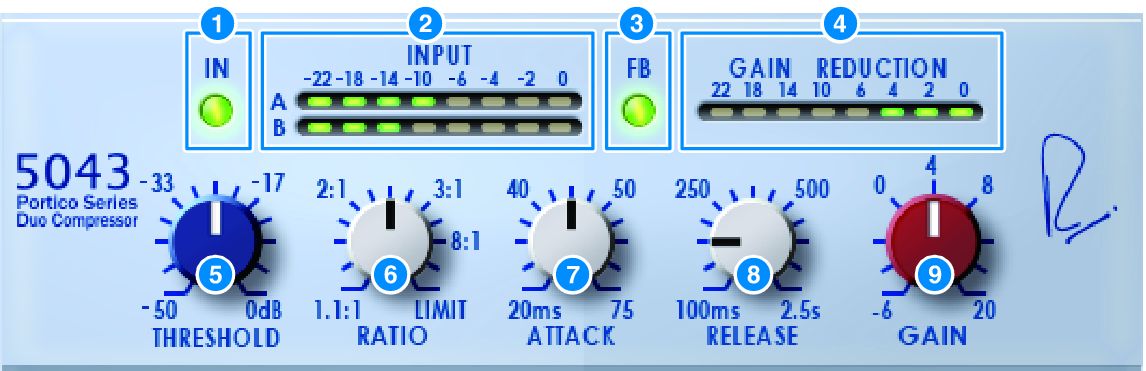
a | IN button Switches compressor bypass on/off. When bypassed, the button is unlit. However even in the bypassed state, the signal passes through the input/output transformer and amp circuit. |
b | INPUT meter Shows the level of the input signal. One meter is shown in the case of DUAL, and two meters in the case of STEREO. |
c | FB button Switches the gain reduction method between a FF (Feed-Forward) circuit and a FB (Feed-Back) circuit. The button is lit if the FB circuit type is selected. The FF circuit is the type used by most compressors today. Use it when you want to apply firm compression while minimizing changes in the tonal character. The FB circuit is the type used by vintage compressors. Use it when you want to apply smooth compression while adding device-specific coloration to the sound. |
d | GAIN REDUCTION meter Indicates the amount of gain reduction. |
e | THRESHOLD knob Adjusts the level at which the compressor begins to apply. |
f | RATIO knob Adjusts the compression ratio. If the knob is turned all the way to the right, this becomes a limiter. |
g | ATTACK knob Adjusts the attack time over which the compressor begins to apply. |
h | RELEASE knob Adjusts the release time of the compressor. |
i | GAIN knob Adjusts the output gain. |
 RIVAGE PM Series