


MONITOR screen (oscillator)
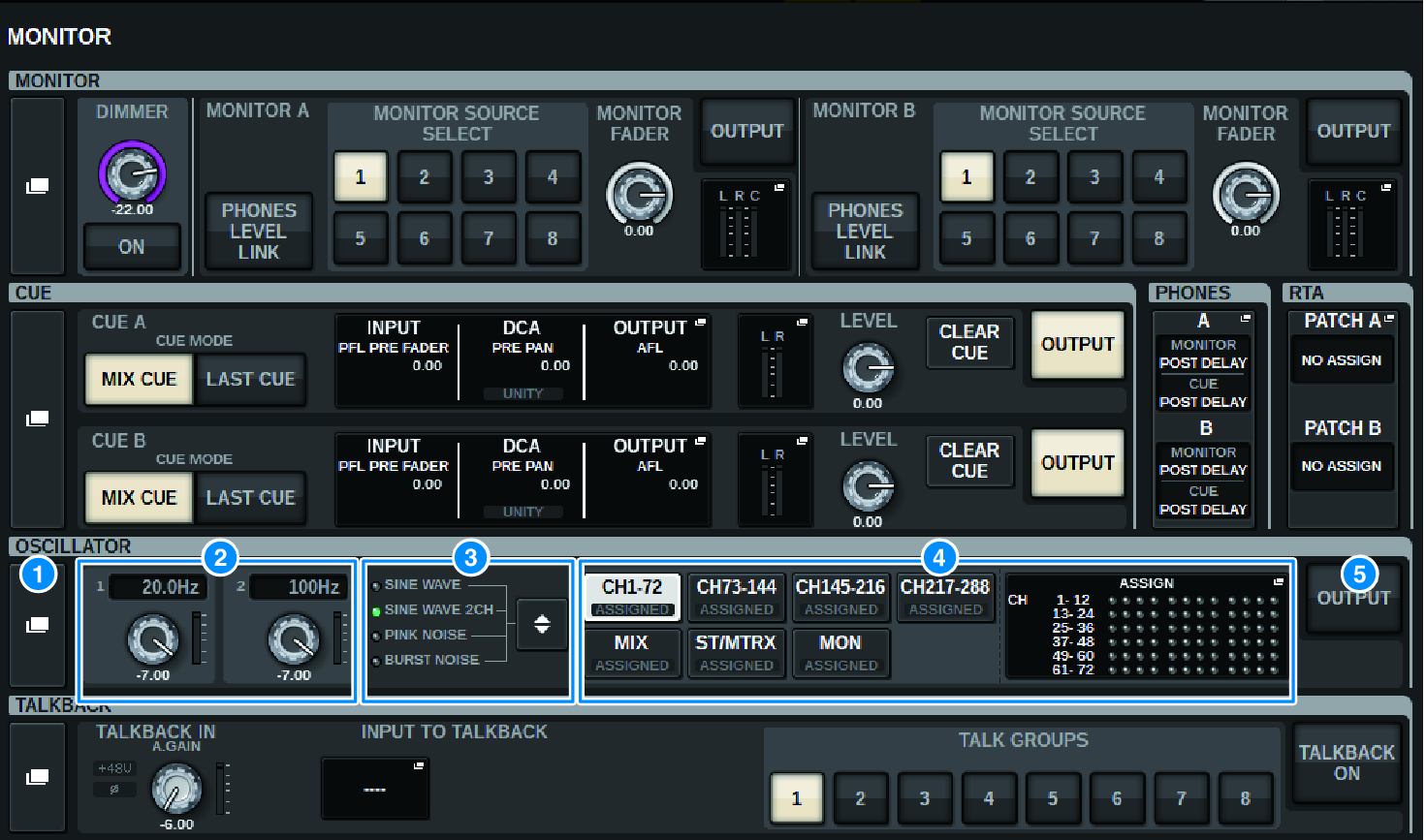
This screen contains the following items.
a | OSCILLATOR popup button Enables you to access the OSCILLATOR popup window, in which you can make detailed oscillator settings. |
b | OSCILLATOR LEVEL field Adjusts the level of the oscillator. A meter beside the LEVEL knob indicates the output level of the oscillator. If OSCILLATOR MODE is set to SINE WAVE, the frequency of the oscillator is shown. Press the LEVEL knob to adjust the oscillator level using the corresponding screen encoder. The range is –96.00 dB to 0.00 dB. |
c | OSCILLATOR MODE field Indicates the selected oscillator mode. Pressing the MODE button repeatedly will switch modes.
|
d | OSCILLATOR ASSIGN field An indicator lights to indicate the currently-selected oscillator output destination (input channels, buses or monitor). Use the buttons at the left to switch the indicators. A green “ASSIGNED” indicator lights up on buttons that contain a channel/bus selection. Press this field to open the OSCILLATOR popup window, in which you can assign the oscillator output to buses. |
e | OSCILLATOR OUTPUT button Turns the oscillator output on or off. |
 RIVAGE PM Series