


GEQ/PEQ EDIT screen (8BandPEQ)
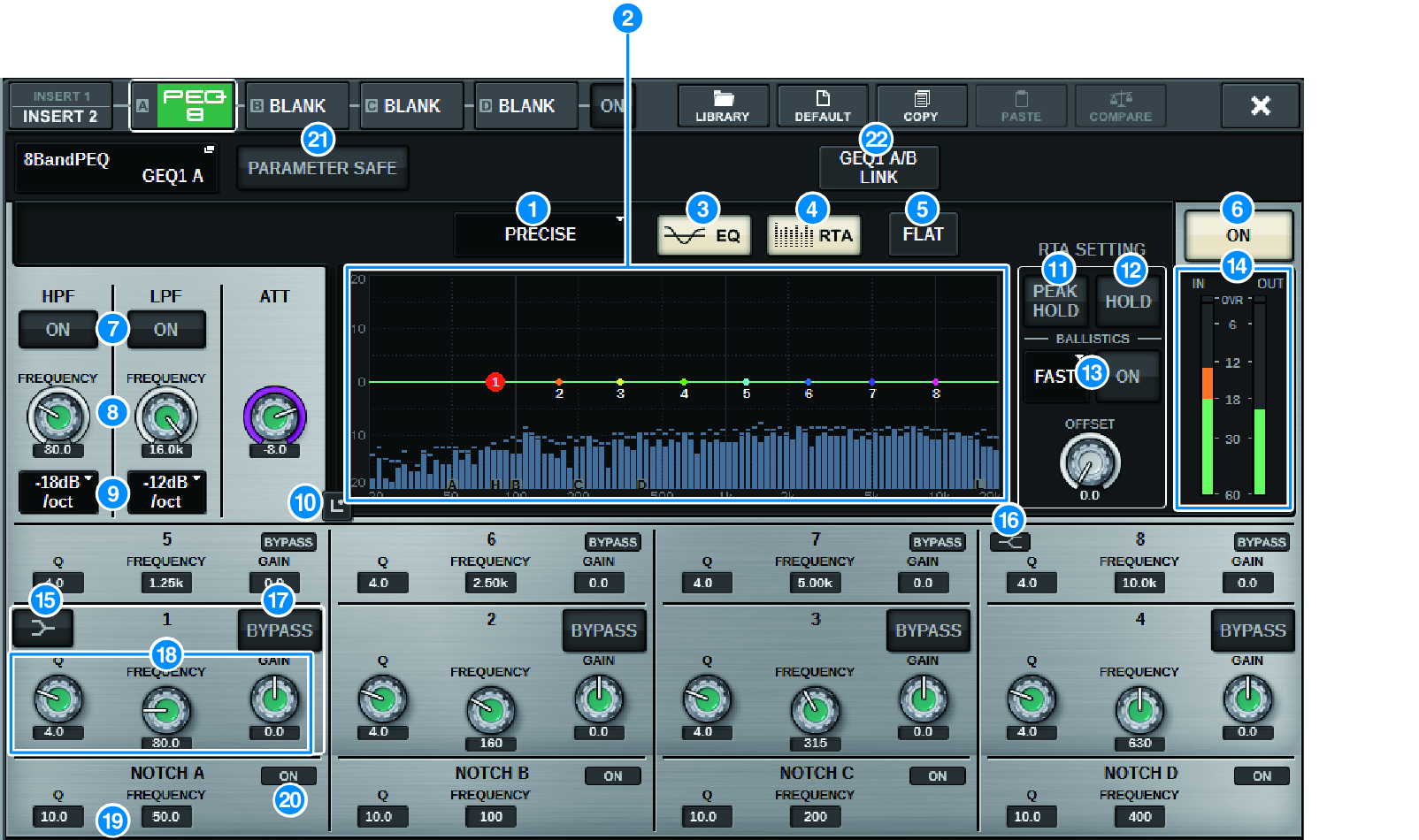
This screen contains the following items.
a | EQ type select button Switches the EQ type to PRECISE, AGGRESSIVE, SMOOTH, or LEGACY. |
b | PEQ graph Displays the parameter values for the PEQ and filters. |
c | EQ button Press this button to display the EQ graph. |
d | RTA button If this button is on, a semi-opaque frequency analysis graph of the input signal (immediately after EQ) will be superimposed on top of the EQ frequency response graph. |
e | FLAT button Press this button to reset the GAIN parameters of all PEQ bands to 0 dB. All ON buttons for the notch filter will be turned off. All parameter values other than those above will retain the same values, without being reset. |
f | PEQ ON button Switches the currently-selected PEQ on or off. |
g | HPF/LPF ON button Switches the HPF/LPF on or off. |
h | HPF/LPF FREQUENCY knob Sets the cutoff frequency of the HPF/LPF. Use the screen encoder or the [TOUCH AND TURN] knob to adjust the value. |
i | HPF/LPF type select button Enables you to set the HPF/LPF attenuation per octave. |
j | Touch EQ button Press to enlarge the EQ graph and touch to adjust the EQ parameters. |
k | PEAK HOLD If this button is on, the analyzed frequency response graph will hold the peak level indication. |
l | HOLD button If this button is on, the frequency response graph will indicate and hold the result of the frequency analysis. |
m | BALLISTICS field
|
n | EQ IN/OUT level meters Indicate the peak level of signals before and after the EQ. For a stereo channel, these meters indicate the level of both the L and R channels. |
o | LOW SHELVING ON/OFF button Turn on this button to switch the LOW band to a shelving type filter. |
p | HIGH SHELVING ON/OFF button Turn on this button to switch the HIGH band to a shelving type filter. |
q | BYPASS button Enables you to bypass bands independently. |
r | EQ parameter setting field Indicate the Q, FREQUENCY, and GAIN parameters for BAND 1–8. Select a field to display the knobs.Use the corresponding screen encoder or the [TOUCH AND TURN] knob to adjust the parameters. |
s | Notch parameter setting field Indicate the Q and FREQUENCY parameters for the notch filter. Select a field to display the knobs.Use the corresponding screen encoder or the [TOUCH AND TURN] knob to adjust the parameters. |
t | Notch ON button Each of four notch filters features an ON button. |
u | PARAMETER SAFE button Switches Recall Safe on/off for the parameters. |
v | PEQ LINK button Press this button to access the PEQ LINK window, in which you can link the PEQ of paired channels. |
 RIVAGE PM Series