


Setting the send levels from output channels (MIX, STEREO) to MATRIX
This explains how to set send levels from MIX/STEREO channels to the MATRIX BUS.
- Open the SEND FROM screen for MATRIX channels.
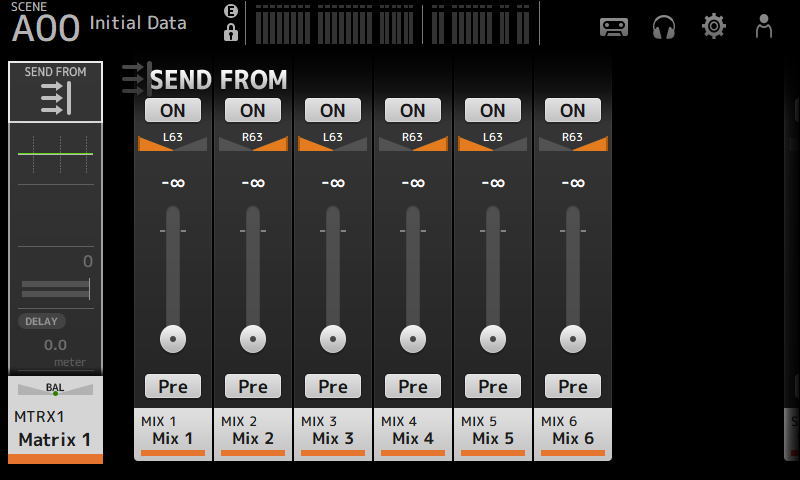
- Touch the ON button for the MIX and/or STEREO channels to turn them ON (default setting is ON).
- Use the Pre button to switch whether to send before or after the fader.
- Drag the SEND LEVEL sliders to adjust send levels from the MIX and/or STEREO channels.
- If the MATRIX BUS is set to stereo, adjust the pan with SEND PAN sliders.
NOTE
- Left and right channel send levels can be adjusted independently for channels set to stereo, such as MIX and STEREO channels.
- If the MATRIX BUS is set to stereo, the SEND PAN sliders on channels set to stereo, such as MIX and STEREO channels, become BAL (balance) sliders.
- The MATRIX BUS can be switched between stereo and mono via the BUS SETUP screen on the SETUP screen.
 DM3 Series