


DANTE SETUP (Setup) screen
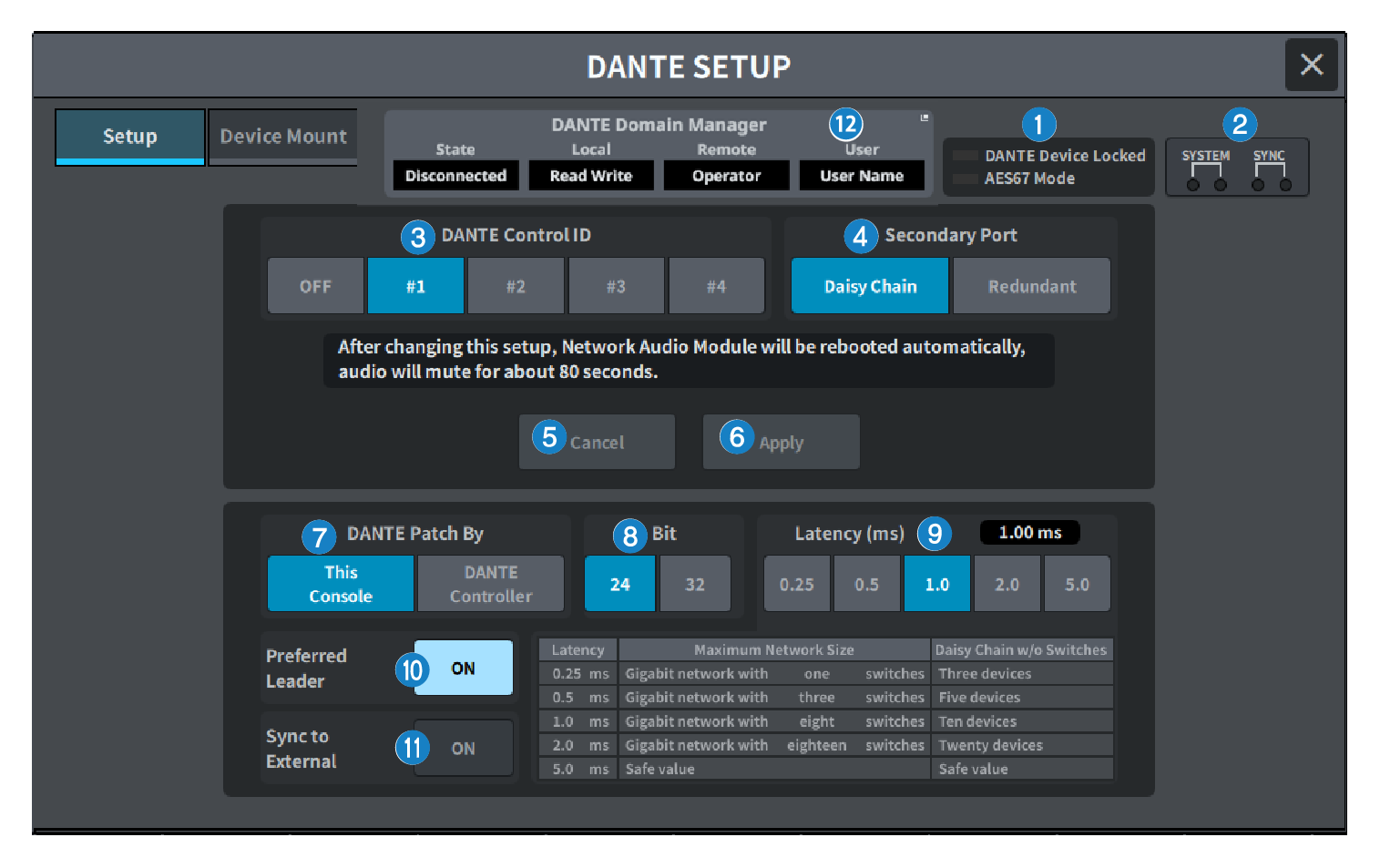
This configures the Dante audio network environment.
a | Status indicator
|
b | SYSTEM/SYNC indicators These indicators show the Dante operational status. Press this to display the messages. In patterns where a message is displayed, an error icon or information icon is displayed next to the indicator. For details on what the indicators show, refer to "Messages". |
c | DANTE Control ID button This sets the ID for the DM series main unit. If the ID is turned OFF, the DANTE Patch By select button is fixed to DANTE Controller, and Dante patching cannot be controlled. Additionally, the mounted I/O DEVICE remote functionality is disabled. If you specify ID #1, the shared settings (Bit/Latency/Word Clock) are also applied to the mounted I/O racks. NOTE
|
d | Secondary Port select buttons Select the Dante audio network connection method: either the daisy chain connection used for simple systems with a small number of connected devices, or the redundant connection used when connecting multiple devices. |
e | Cancel button This cancels the temporarily edited content during the process of editing DANTE Control ID or Secondary Port. |
f | Apply button If you have edited the DANTE Control ID setting or the Secondary Port setting, the settings are applied when you press this button. A dialog box is displayed for you to confirm the change. |
g | DANTE Patch By select buttons When the This Console button is selected, Dante patching can be modified from the DM7 Series. When the DANTE Controller button is selected, Dante patching cannot be controlled. |
h | Bit select button These buttons select either 24 bits or 32 bits as the bit rate of the Dante audio network. |
i | Latency select button Select from 0.25 ms, 0.5 ms, 1.0 ms, 2.0 ms, or 5.0 ms for the latency of the Dante audio network. |
j | Preferred Leader button When turned ON, this increases the unit’s order of priority for being the leader within the Dante audio network. |
k | SYNC TO EXTERNAL button When this is set to ON,, the unit will sync to the word clock supplied from the external clock source. NOTE
|
l | Dante Domain Manager field Displays the status of Dante Domain Manager (DDM). This is displayed if a DDM server exists on the network or if the DM7 series is part of a domain. Press this to display the DANTE DOMAIN MANAGER screen. |
State Indicates the status of joining the domain.
| |
Local Displays the status of the Dante settings (including Dante patching) on the DM7 series.
| |
Remote Displays the control status of the Dante settings (including Dante patching) for devices on the DM7 series network.
| |
User Displays the user name when logged in to DDM.
|
 DM7 Series