


Enabling the HDMI Control function
By turning On the HDMI Control function, you can use convenient functions such as linking to TV operations. To listen to audio from a TV that only supports ARC, you have to turn On the HDMI Control function. If necessary, turn the HDMI Control function On.
- The following default settings are provided.
- Models for U.K. and Europe: Off
- Models for other areas: On
Use an HDMI cable to connect the sound bar to a TV, then turn the HDMI Control function On to allow you to do the following.
- Link turning the TV on and off
- Using the TV remote control to adjust the volume of the sound bar
- Automatically switch the input to “TV”
- Use the ARC function to output TV audio from the sound bar
When the HDMI Control function is needed to listen to audio from a TV
To connect a TV that only supports ARC using an HDMI cable, you have to turn the HDMI Control function and ARC function to On.
When the “HDMI Control” is “On”, the “ARC” setting can be used. The default setting of “HDMI Control” is “Off” and the default setting of “ARC” is “On”.
HDMI Jack(s) of the TV you want to connect to | You can listen to TV audio also when the HDMI Control function is set to Off |
|---|---|
eARC/ARC supported HDMI IN jack | , |
HDMI IN jack and OPTICAL jack | , |
ARC supported HDMI IN jack | - |
- If you cannot output audio from the TV sound using the sound bar, refer to the TV instruction manual as well.
Enabling the HDMI Control function
Set “HDMI Control” to “On” from the TV Setup menu.
- Press the ~ (Setup) key.
- The Setup menu appears on the TV.
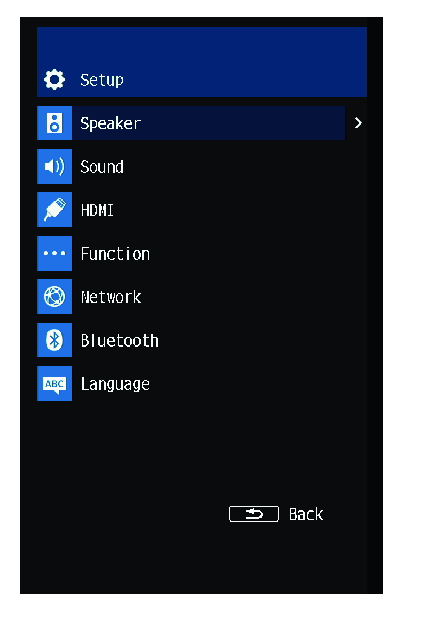
- In “HDMI” Select “HDMI Control”.
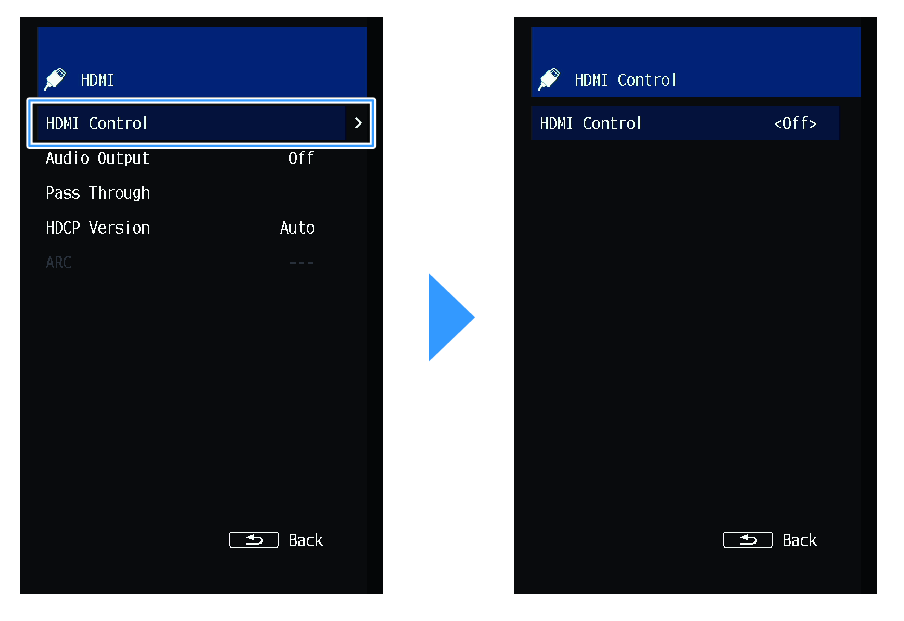
- In the HDMI Control screen, select “On”.

- Press the ~ (Setup) key.
- The Setup menu closes.
This completes the setting.
- Setting the HDMI Control function to On consumes more power than when it is set to Off.
- When connecting an HDMI jack that supports only ARC on the TV to the HDMI OUT/TV (eARC) jack on the sound bar, set also “ARC” to “On”. The default setting is “On”.
 TRUE X BAR 90A (SR-X90A)