


Controlling the REV-X plug-in parameters
REV-X is a reverb algorithm that provides a high-density, richly reverberant sound quality, with smooth attenuation, and spread and depth that work together to enhance the original sound. You can choose one of three programs to suit the acoustic sound field and your intentions: REV-X Hall, REV-X Room, and REV-X Plate.
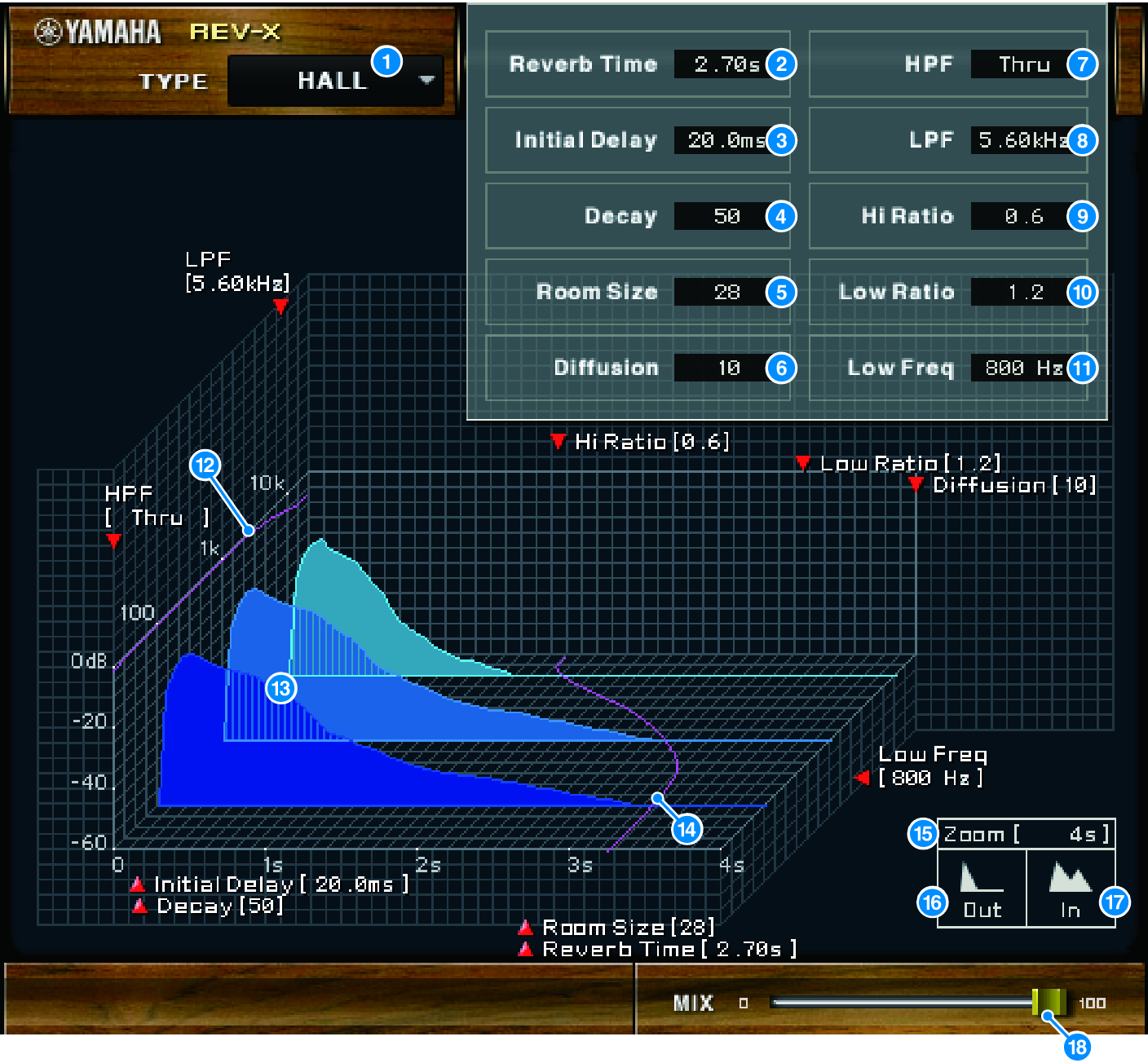
a | EFFECT TYPE Enables you to select an effect type. |
b | Reverb Time Duration of time until the reverberation attenuates and stops. Higher values extend the reverberation. |
c | Initial Delay Duration of time between sound input and the start of reverberation. Higher values delay the start of reverberation. |
d | Decay Shape of reverberation envelope. Reverberation characteristics are determined by the value. |
e | Room Size Size of space. Higher values simulate larger spaces. This value is linked with the Reverb Time value. When you change this value, the Reverb Time value changes. |
f | Diffusion Density and spread of reverberation. Higher values increase the density and enhance the spread. |
g | HPF This filter cuts the low frequency range of the reverberation. The range below the frequency specified by this value is cut. This filter does not affect the original source sound. |
h | LPF This filter cuts the high frequency range of the reverberation. The range above the frequency specified by this value is cut. This filter does not affect the original source sound. |
i | Hi Ratio Length of reverberation in the high frequency range. The reverberation duration of the high frequency range is expressed as a ratio relative to Reverb Time. |
j | Lo Ratio Length of reverberation in the low frequency range. The reverberation duration of the low frequency range is expressed as a ratio relative to Reverb Time. |
k | Low Freq Frequency value that serves as the basis for the Lo Ratio value. The frequency band below this value is affected by the Lo Ratio parameter setting. |
l | Filter frequency response curve The curve changes depending on the HPF and LPF values. |
m | Reverberation images These images represent the high-range (10kHz), mid-range (1kHz), and low-range (100Hz) reverberation. These images change shape depending on the parameter values. The vertical axis represents the level; the horizontal axis represents reverb time; the shape represents the envelope. |
n | Reverb time curve This curve represents the high-range (10kHz), mid-range (1kHz), and low-range (100Hz) reverb time. The curve changes depending on the Reverb Time, Hi Ratio, and Lo Ratio parameter values. |
o | Zoom This field indicates the time duration (in seconds) as displayed by the time axis (horizontal axis). |
p | Zoom Out button Click this button to increase the time value (in seconds) as displayed by the time axis (horizontal axis). As a result, the display zooms out on the horizontal axis. |
q | Zoom In button Click this button to decrease the time value (in seconds) as displayed by the time axis (horizontal axis). As a result, the display zooms in on the horizontal axis. |
r | MIX slider This control enables you to adjust the mix balance of the dry and wet (effect) sounds. When the balance is 0%, only the dry sound is output. When the balance is 100%, only the wet sound is output. |
 RIVAGE PM Series