


Configuring Dante Controller
Connect the network port of the computer to a GbE-compatible network switch. Configure the computer to obtain an IP address automatically (this is the default setting). You must make the following settings for Dante Controller.
- For multitrack recording: Patch audio signals from the I/O rack to the DVS or Dante Accelerator card for multitrack recording.
- For virtual sound check: Patch audio signals in such a way that they will be output from the computer to the Dante audio network, then routed to the channels on the RIVAGE PM series (“Patching for multitrack recording and virtual sound check”).
The following example shows Dante Controller settings for when playback signals from Dante Accelerator are patched to HY144-D card for a virtual sound check.
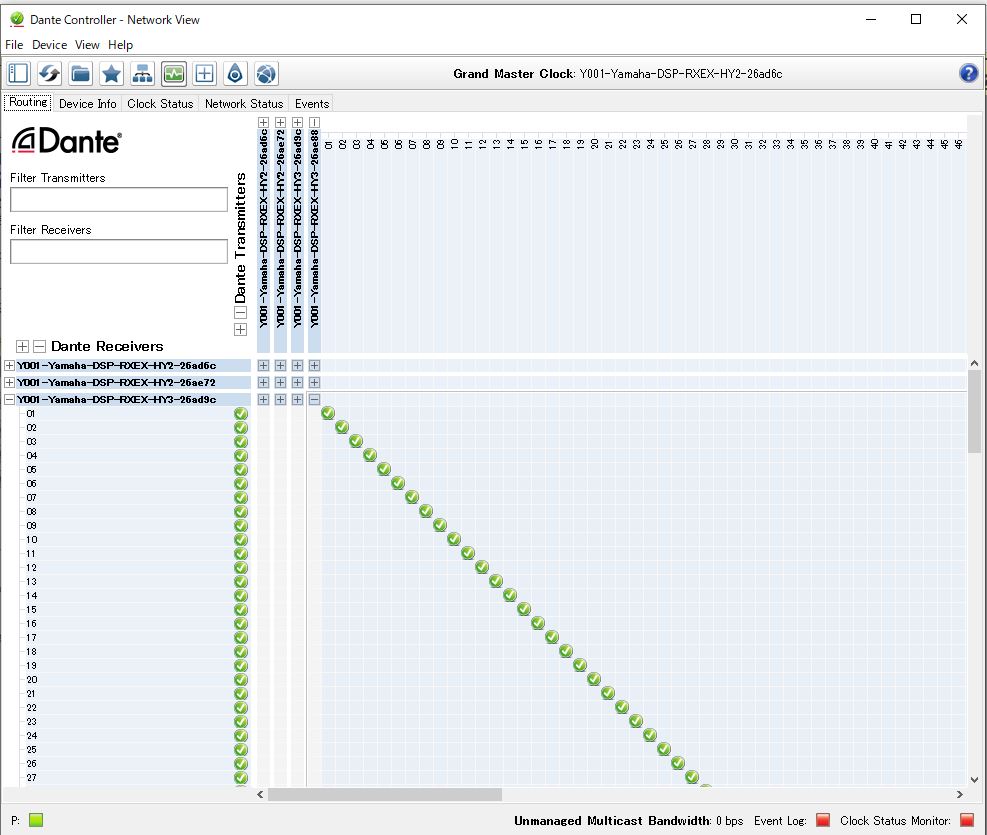
During multitrack playback, you can switch these settings easily using the VIRTUAL SOUND CHECK ON button on the RECORDING PATCH screen.
NOTE
- Please refer to the Dante Controller manual for more information about operations and settings of the Dante Controller.
 RIVAGE PM Series