


Using Program Changes to recall scenes
The RIVAGE PM series enables you assign a specific scene to be recalled to each Program Change number, so that when a scene is recalled on the RIVAGE PM series, a Program Change message of the corresponding number will be transmitted to an external device. Conversely, the corresponding scene can be recalled when a Program Change message is received from an external device.
- Connect the control surface to an external device.
NOTE
- If using the DSP engine, connect the DSP engine with the external devices. The subsequent explanation is for when using the control surface.
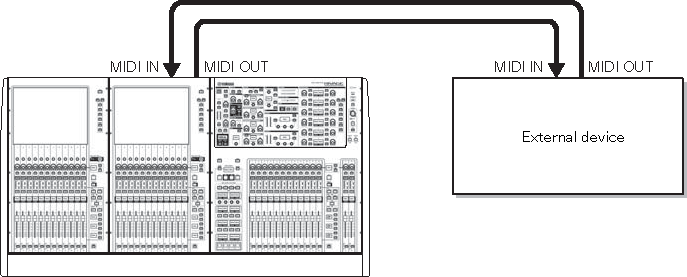
- As described in “Basic MIDI Settings”, select the MIDI channels that will be used to transmit/receive Program Changes.
- “Basic MIDI Settings”
- Press the PROGRAM CHANGE tab.
- The MIDI/GPI window (PROGRAM CHANGE page) appears.
- Use the buttons in the PROGRAM CHANGE MODE field to select the Program Change transmission/reception mode.
- You can select one of the following two Program Change transmission/reception modes.
- ・ Multi mode (when the MULTI button is on):
- Program changes of all MIDI channels will be transmitted and received. (The transmit/receive channel specified in the MIDI page will be ignored.) When a Program Change is received, the scene assigned to the corresponding MIDI channel and program number in the list will be recalled. When you recall a specified scene on the RIVAGE PM series, the Program Change of the corresponding MIDI channel and program number in the list will be transmitted.
- • Single mode (when the SINGLE button is on):
- Only Program Changes of the transmit (Tx) and receive (Rx) channels specified in the MIDI page will be transmitted and received. When a Program Change on the Rx channel is received, the scene assigned to that program number of the corresponding channel in the list will be recalled. When you recall a specified scene on the RIVAGE PM series, the Program Change of the corresponding program number will be transmitted on the Tx channel shown in the list. (If an event is assigned to more than one program number on the same channel, the lowest-numbered program number will be transmitted.) If you turn on the OMNI button or BANK button in Single mode, operation will change as follows.
- • When the OMNI button is on:
- Program changes of all MIDI channels will be received. However, regardless of the MIDI channel that is received, the scene assigned to the corresponding program number of the Rx channel will be recalled. Turning on the OMNI button will not change the operation for Program Change transmission.
- • When the BANK button is on:
- The CH indication in the list will change to BANK (bank number), and Bank Select (Control Change #0, #32) and Program Change messages can be transmitted and received. This can be convenient if you want to control more than 128 scenes on a single MIDI channel. When Bank Select and then Program Change messages (in that order) are received on the Rx channel, the scene assigned to that bank number and program number in the list will be recalled. When you recall a specific scene on the RIVAGE PM series, Bank Select and Program Change messages for the bank number and program number assigned to that scene will be transmitted on the Tx channel. (If the same scene is assigned more than once in the list, the lowest-numbered bank number and program number will be transmitted.)
NOTE
- The settings of the OMNI and BANK buttons are ignored in Multi mode. If the BANK button is on and only a Program Change on an applicable MIDI channel is received, the last-selected bank number will be used. If the BANK button is on, the OMNI button can also be turned on at the same time. In this case, Bank Select and Program Change messages of all MIDI channels will be received.
- Use the buttons in the PROGRAM CHANGE field to turn transmission and reception on or off, and make settings for echo output.
- To assign a scene to each program number, press the desired cell in the PROGRAM CHANGE ASSIGNMENT column on the list.
- The MIDI PROGRAM CHANGE popup window appears. In this window, you can specify the scene (to be recalled) that you want to assign to each program number.
- Select SCENE in the TYPE field, and then use the LIST/DIRECT field to select a desired scene number for recall operations.
- To select an item, use the [TOUCH AND TURN] knob. Press the OK button to confirm the change and close the MIDI PROGRAM CHANGE popup window.
NOTE
- Alternatively, you can select a scene number by pressing the desired number in the field or by turning the corresponding screen encoder.
- Assign scenes to other program numbers in the same way.
- With these settings, recalling a specified scene on the RIVAGE PM series will cause the corresponding Program Change (or Bank Select and Program Change) messages to be transmitted to an external device. When an external device receives Program Change (or Bank Select plus Program Change) messages on the appropriate MIDI channel, the scene assigned to that program number of the corresponding MIDI channel (or bank number) will be recalled.
NOTE
- You can use the CLEAR ALL button to erase all assignments to program numbers.
- Assignments to program numbers are maintained as settings for the entire system, rather than for individual scenes.
- In Single mode, if the same scene is assigned to more than one program number on a Tx channel, only the lowest program number will be transmitted. (If the BANK button is on, only the program number of the lowest bank number will be transmitted.)
- In Multi mode, if the same scene is assigned to more than one MIDI channel and more than one program number, only the lowest program number on each MIDI channel will be transmitted.
 RIVAGE PM Series