


NUENDO Live Screen
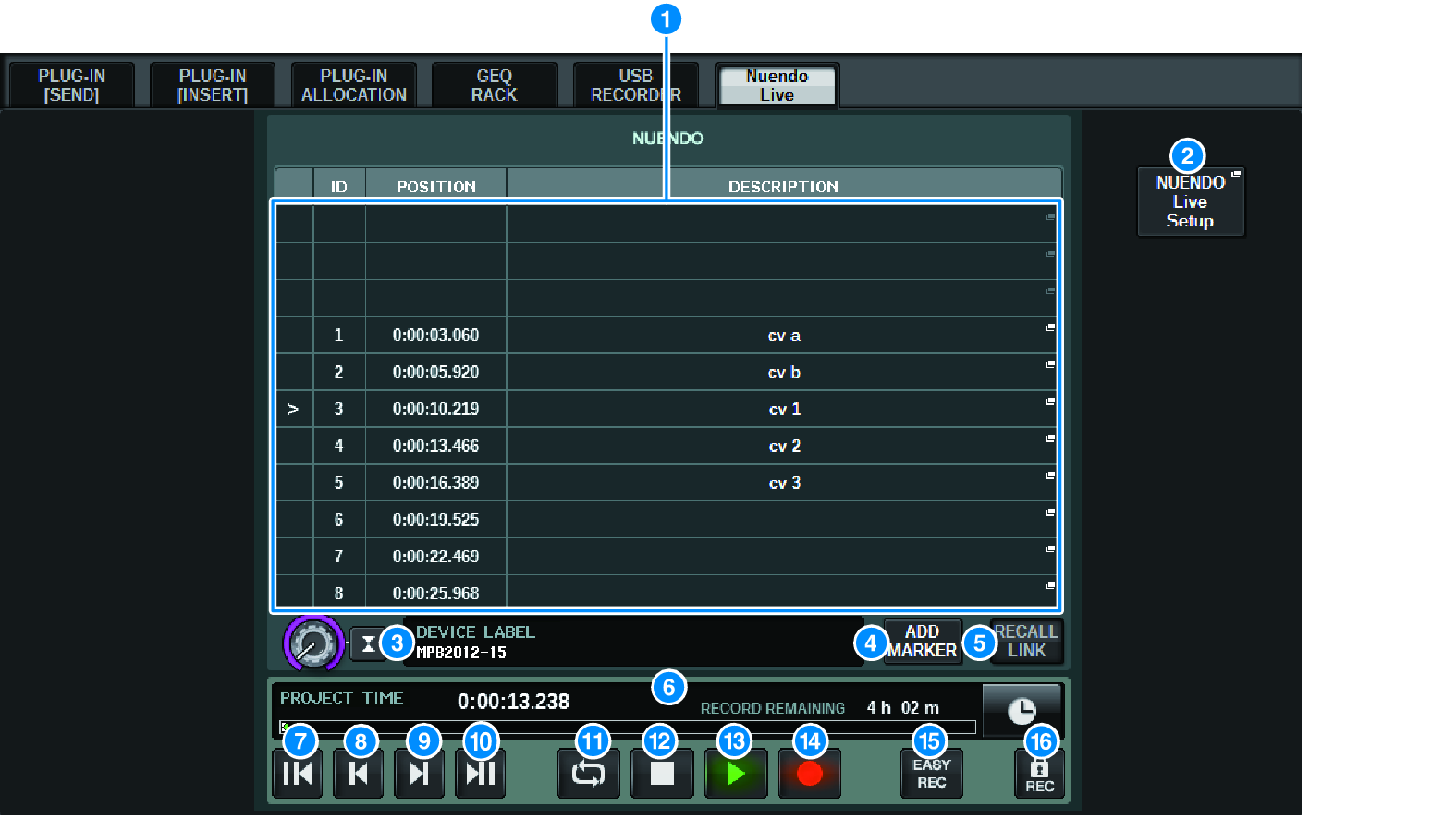
This screen contains the following items.
a | Marker list field Lists the marker information recorded in the current Nuendo Live project. You can scroll through the list by operating the knob with the screen encoder or the [TOUCH AND TURN] knob. When you press this field, a keyboard window allowing you to edit the marker information will appear. |
b | NUENDO Live Setup button The "“NUENDO Live SETUP Screen”" will appear, where you can specify the device to be used for communication with NUENDO Live. |
c | DVS information display Shows the device label of the selected DVS. If you are connecting with SPECIFIED IP ADDRESS, the IP address of the connection destination is displayed. |
d | ADD MARKER button Adds a marker to the project at the current playback position. |
e | RECALL LINK button Specifies whether a marker will be created when you recall a scene. If this function is turned on, the button will be lit. |
f | Playback position information display This displays information for the current position of the Nuendo Live project. You can press the button at the right to switch the time display format. |
g | GO TO PROJECT START button Returns the playback position to the start of the project. |
h | GO TO PREVIOUS MARKER button Returns the playback position to the previous marker. |
i | GO TO NEXT MARKER button Advances the playback position to the next marker. |
j | GO TO PROJECT END button Advances the playback position to the end of the project. |
k | CYCLE button Turns repeat on/off for the project. |
l | STOP button Stops playback/recording of the project. |
m | PLAY button Starts playback of the project. |
n | RECORD button Starts/stops recording for the project. |
o | EASY RECORDING button Immediately starts recording on all tracks. When you press this, the following occurs: the location moves to the last-recorded position, all tracks are set to record mode, recording begins, the record panel is displayed, and the panel is locked. Recording is done retroactively from the actual recording start position to the time set in Pre-Record Time. (Default setting: 10 seconds) |
p | Record lock button Turns recording status lock on/off. This prevents recording from being accidentally stopped during recording. |
 RIVAGE PM Series