
Introduction
1. Introduction
Thank you for downloading Yamaha AFC Image Controller.
AFC Image Controller is application software for Windows and macOS used to control the AFC Image sound image control system that runs on Yamaha or NEXO DME series signal processors. AFC Image is a sound image control system that realizes three-dimensional sound image localization using the object-based audio method. It enables the provision of immersive sound experiences in a variety of applications, including musicals, theatrical plays, operas, concerts, and installations.
1.1. Attention
-
All copyrights of this software and user guide are owned by Yamaha Corporation.
-
This software and user guide may not be reproduced or modified in whole or in part without permission.
-
Please note that we are not responsible for any results or effects of using this software or user guide.
-
All illustrations and screens shown in this user guide are for instructional purposes only. Therefore, the actual specifications may differ.
-
Windows is a registered trademark of Microsoft Corporation in the United States and other countries.
-
Be aware of copyrights when using audio files for commercial purposes. Copyright infringement is prohibited by law.
-
Company names and product names mentioned in this document are trademarks or registered trademarks of their respective companies.
-
The application software may be upgraded without prior notice for improvement purposes. The latest application software can be downloaded from the Yamaha Pro Audio site.
https://www.yamahaproaudio.com/
1.2. What AFC Image Controller Can Do
-
AFC Image Controller can control the parameters of the AFC Image components placed inside the DME series. The sophisticated GUI allows for precise and quick control of the sound image by manipulating sound objects and adjusting the sound image size.
-
The three-dimensional sound image localization can be controlled by placing sound objects and speakers at any positions on the Cartesian coordinates (X, Y, Z).
-
This software can control the parameters of the 3D reverb effect, which realizes the reverb according to the sound object position.
-
You can save and recall parameters of sound objects and 3D reverb effects in Scene data.
-
This software can adjust the coordinates of each speaker, as well as the equalizer and delay.
-
You can set "speaker zoning" to play sound objects through specific groups of speakers. You can also set a rendering area that converts panning operations in logical coordinates on a Digital Audio Workstation (DAW) or mixing console into any shape in real space.
-
This software supports external control via the Open Sound Control (OSC) protocol and ADM-OSC.
-
A single AFC Image component inside the DME processor can be operated from up to eight computers.
1.3. Operating Environment/Installation
1.3.1. Software operating environment
|
OS |
Windows 11、Windows 10 |
|
CPU |
2 GHz or faster Intel 64-compatible processor |
|
Memory |
4 GB or more |
|
Storage |
1 GB or more of free space |
|
Display |
1280×1024 pixels |
|
Other |
Equipped with a mouse or other pointing device and Ethernet (1000BASE-T/100BASE-TX) |
|
OS |
macOS 13 / 14 / 15(Intel/Apple silicon) |
|
CPU |
2 GHz or faster Intel Core family processor, Apple Silicon |
|
Memory |
4 GB or more |
|
Storage |
1 GB or more of free space |
|
Display |
1280×1024 pixels |
|
Other |
Equipped with a mouse or other pointing device and Ethernet (1000BASE-T/100BASE-TX) |
1.3.2. Installing AFC Image Controller
Download the AFC Image Controller installer from the Yamaha Pro Audio site.
There is a link on the application page.
https://www.yamahaproaudio.com/
-
Windows
Unzip the downloaded compressed file and follow the instructions of the installer to install the software. -
macOS
Unzip the downloaded compressed file and install the software by following the setup dialog.
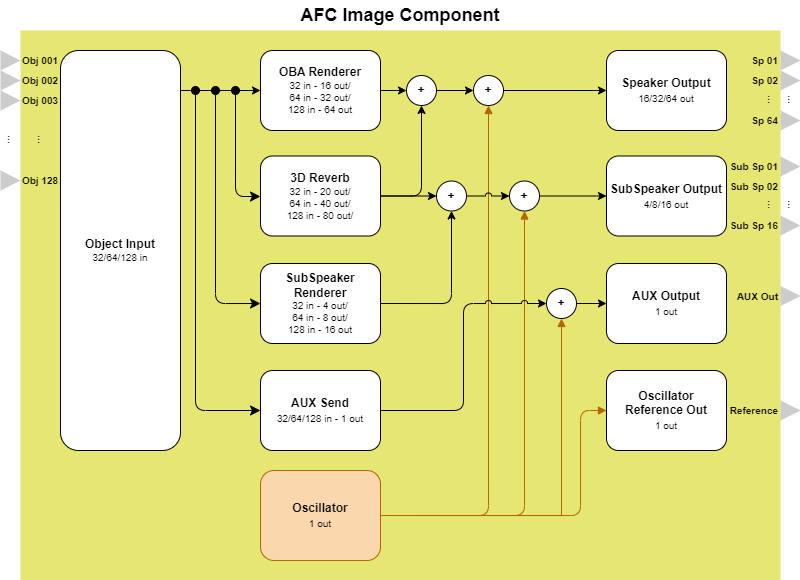
1.4. AFC Image Component System Block Diagram
-
Object Input : Receives input signals from other audio components.
-
OBA (Object Based Audio) Renderer : Using the object-based audio method, the renderer calculates the output signals to each speaker based on the position information of the sound object in three-dimensional space.
-
3D Reverb : Processes a reverb effect that reproduces the reflection and reverberation of sound in three-dimensional space based on the sound object position.
-
SubSpeaker Renderer : Calculates the output signals of the selected sound object to speakers in a speaker group other than the assigned speaker zone.
-
Oscillator : Generates signals such as sine waves and noise.
-
Speaker Out : Sends the audio signals processed by the OBA Renderer and 3D Reverb to each speaker.
-
SubSpeaker Out : Sends audio signals to the sub speaker.
-
AUX Send/AUX Out : Mixes in mono the input signals of the selected sound object and outputs them for purposes such as monitoring or LFE (Low Frequency Effect).
-
Oscillator Reference Out : Outputs the original signals of signals generated by Oscillator. The original signals can be used to measure the transfer function in speaker tuning.