
Preparation
2. Preparation
2.1. System Setup and Connections between Devices
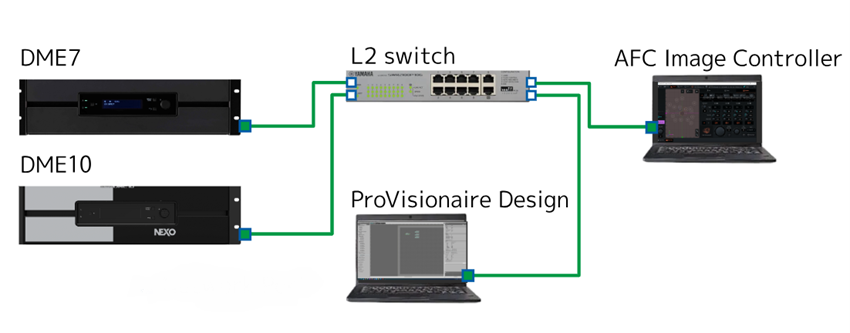
To use AFC Image Controller online, a DME7 or DME10 (hereafter referred to as "DME") processor is required. ProVisionaire Design sends various settings, including the AFC Image components, to the device. AFC Image Controller controls the parameters of the AFC Image components placed in the DME processor.
2.1.1. Preparing AFC Image components
-
To place the AFC Image components inside the DME series processor, use ProVisionaire Design. If ProVisionaire Design has not been installed, download it from the following URL.
https://www.yamahaproaudio.com/ -
Start ProVisionaire Design, select a DME processor from the Devices area, and place it by a drag-and-drop operation. Select the required information in the dialog that appears.
-
Double-click a DME processor and place "AFC Image" from the Components list.
The DME7 processor allows for up to 64 input channels and 32 output channels of AFC Image components, while the DME10 processor allows for up to 128 input channels and 64 output channels of AFC Image components.
In the dialog that appears, set the number of channel inputs and the component ID.Set a desired component ID from the drop-down list. -
You can set a PIN code for the AFC Image components.
Select the placed "AFC Image component." In the Properties area that appears, turn "Access PIN" on and set a 4-digit hexadecimal number (0000 to FFFF)(not case-sensitive).
Once you have set the PIN code, you cannot check it.If you forget your PIN code, turn [Access PIN] off and on again. Then, set a new PIN code. -
Connect the audio system to the placed AFC Image component. To learn how to connect them, refer to the ProVisionaire Design User Guide.
2.1.2. Network settings
AFC Image Controller and DME processors must be operated on the same network. In addition, since the DME processors use Dante for audio input and output, the Dante network settings must also be configured.
For the ProVisionaire Design network settings, refer to the ProVisionaire Design User Guide.
For the DME network settings, refer to the DME7/DME10 Reference Manual.
|
If a DHCP server is not used, set a fixed IP address for the network card of the computer. The recommended settings are:
IP address: 192.168.0.253 Subnet mask: 255.255.255.0 |
| When connecting devices, we recommend using separate networks for control and for Dante. |
2.1.3. License authentication
The number of input and output channels available for the AFC Image components depends on the number of activated device licenses.
To use the AFC Image components with the DME7 processor, you will need to purchase and activate the optional expansion kit "DEK-AFC-I" (sold separately).
With the DME10 processor, you can use one AFC Image component with 32 input channels and 16 output channels even if the expansion kit "NX-AFC-I" is not activated.
| To learn how to activate the kit, refer to the "Device Activation Guide" for each product. |