
Snapshot Integration with DME
5. Snapshot Integration with DME
5.1. SnapShot Linking Procedure
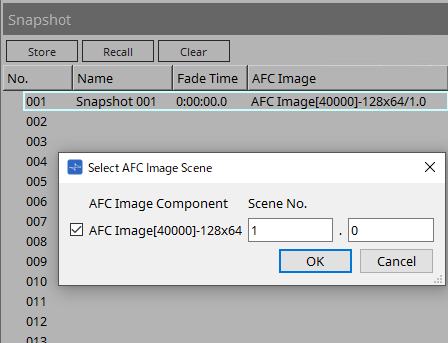
You can register a scene created with the AFC Image Controller to a Provisionare Design snapshot and recall it at the same time.
| AFC Image components cannot be registered in a Parameter Set. |
Register a snapshot from Store of Snapshot.
Double-click the AFC Image column of the registered snapshot.
In the dialog that appears, register any AFC Image component and scene number.
When you click Recall, if a scene with the specified number is registered in the AFC Image, that scene will be recalled.
If the scene with the specified number is not registered in the AFC Image, nothing will be recalled for the AFC Image.
5.2. How to Change Number of In/Out of Placed AFC Image Component
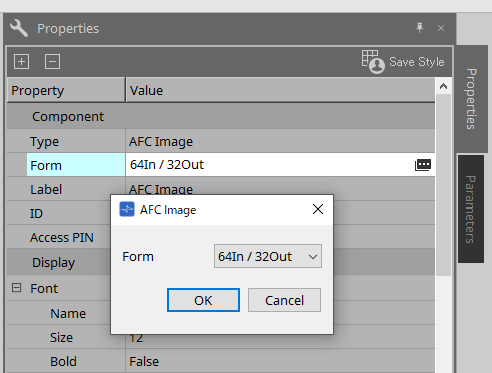
Click on a placed AFC Image component.
From Property on the right side of the screen, click the Value column of Component > Form.
In the AFC Image dialog of Form, change the number of inputs and outputs to the desired number.
|
© 2025 Yamaha Corporation
|