


Part names of the sound bar (front/top)
This section describes the part names and functions of the front and top of the sound bar.
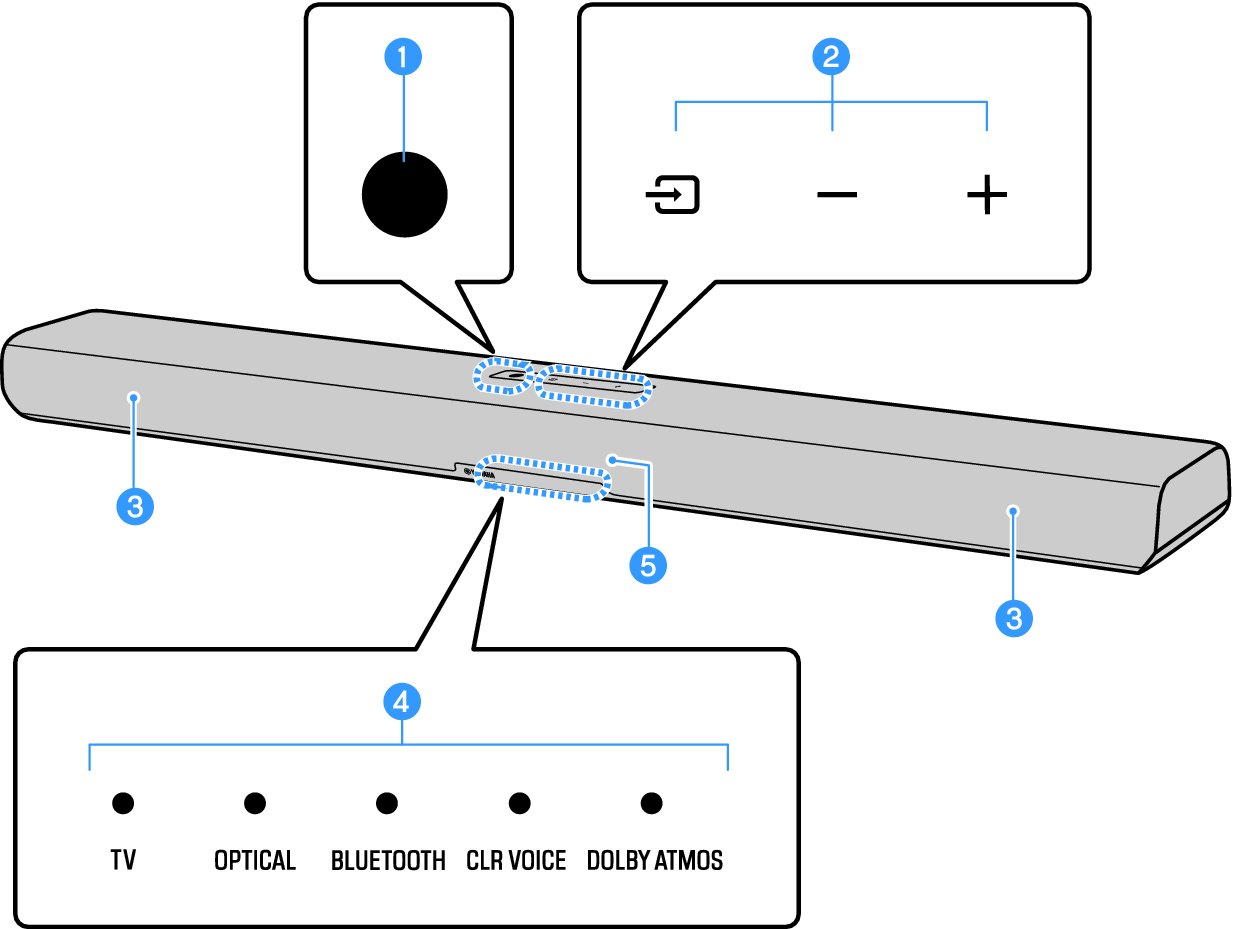
a | Power button Turn the sound bar on and off (standby). |
c | Speakers |
d | Indicators The indicators flash or glow to show the operation and setting status. During normal playback, the setting status is indicated as follows: | |
TV, OPTICAL, or BLUETOOTH: Selected input source (glowing) | ||
CLR VOICE: Clear Voice function is enabled (glowing)/disabled (off) | ||
DOLBY ATMOS: Dolby Atmos audio signal is input during surround playback (glowing green) | ||
NOTE
|

e | Remote control sensor |
NOTICE
- If not using the product for a long period of time, be sure to unplug the power plug from the AC outlet. Even if the product is turned off (standby) by the sound bar’s power button, a small amount of current is still flowing.
NOTE
- To prevent unintended operation, do not place anything on the controls of the sound bar.
Enabling the Child Lock function prevents accidental operation.
- The brightness of the indicators can be adjusted by pressing DIM.
 SR-B40A