
Screen Layout
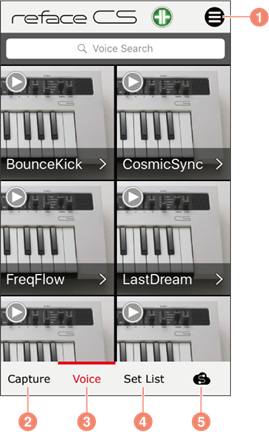
a) For displaying and hiding the Menu.
b) For switching to the Capture screen.
c) For switching to the Voice screen. (For switching to the Performance screen when you connect to MONTAGE or MODX series, and to the Sound screen when you connect to the CP, YC, and CK series.)
d) For switching to the Set List screen.
e) For displaying the Soundmondo screen. Refer to https://soundmondo.yamahasynth.com/ for details.
Menu
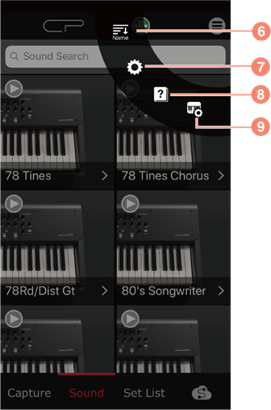
f) For specifying how to sort sounds on the Voice screen. Sounds are sorted by name when “Name” is displayed; by date of capture when “Date” is displayed; and by your rating of the sound when “Rating” is displayed.
g) For displaying the Settings screen.
h) For displaying the manual.
i) For displaying the Transpose screen when you connect to the reface, and for displaying the Live Set Edit screen when you connect to the CP, YC, and CK series. (This icon will not be displayed when you connect to the MONTAGE or MODX series.)