


SURROUND MONITOR SETTINGS popup window
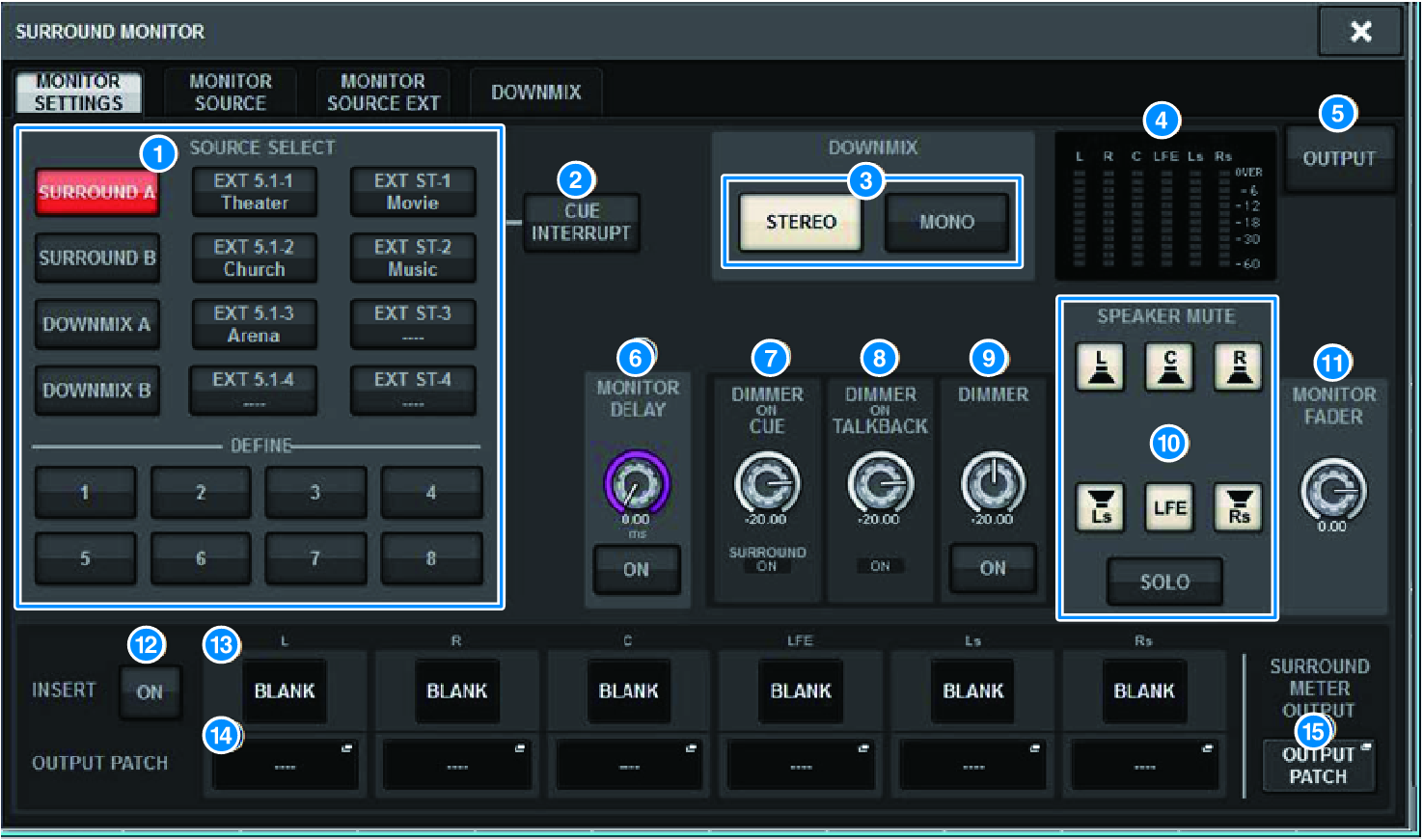
This screen contains the following items.
a | MONITOR SOURCE SELECT buttons Select the source that will be output to the MONITOR bus. |
b | CUE INTERRUPT button Press this button to interrupt the surround monitor signal by the surround cue signal. If this button is on and surround cue is enabled, the surround cue signal will be sent to the surround monitor output. |
c | DOWNMIX buttons To downmix the surround monitor, select either stereo or monaural. |
d | Meter field Shows the output level for each channel of the surround monitor. |
e | MONITOR OUTPUT button Turns the surround monitor output on or off. |
f | MONITOR DELAY knob Indicates the currently-specified delay time. The millisecond value is indicated above the knob, and the delay time value in currently-selected units and the currently-selected scale type are indicated below the knob. However if the scale is set to ms, the delay time value is not shown above the knob. |
g | DIMMER ON CUE knob Adjusts the amount by which the surround monitor signal will be attenuated when surround cue is on.
|
h | DIMMER ON TALKBACK LEVEL knob Adjusts the amount by which the monitor signal will be attenuated when talkback is on.
|
i | DIMMER LEVEL knob Adjusts the amount by which the surround monitor signals will be attenuated when the dimmer is on. |
j | SPEAKER MUTE buttons These buttons individually mute the surround monitor speakers. The SOLO button turns on the solo function for the monitor speakers. This mutes the speakers other than the speaker for which this is on. |
k | MONITOR FADER LEVEL knob Adjusts the surround monitor fader level. |
l | INSERT ON button Switches the plug-in insert on or off. |
m | INSERT button Press this button to display a window allowing you to insert plug-ins into the surround monitor signal. One plug-in can be inserted into each bus. |
n | OUTPUT PATCH popup buttons These indicate the slot or port that is the surround monitor output destination of each channel. Press these buttons to access the OUTPUT PATCH [SURROUND MONITOR] popup window. |
o | SURROUND METER OUTPUT PATCH popup button Press this button to access the OUTPUT PATCH [SURROUND MONITOR] popup window. |
 RIVAGE PM Series