


Using GPI OUT
The GPI OUT ports of the GPI OUT connector enable you to control an external device by performing operations on the RIVAGE PM series.
- Connect an external device to the GPI connector of the control surface.
NOTE
- If using the DSP engine, connect the DSP engine with the external devices. The subsequent explanation is for when using the control surface.
- Press the SETUP button on the menu bar to access the SETUP screen.
- Press the MIDI/GPI [CS] button to open the MIDI/GPI [CS] popup window.
NOTE
- If using the DSP engine, press the MIDI/GPI [DSP] button to access the MIDI/GPI [DSP] popup window.
- This screen includes several pages, which you can switch between using the tabs located at the top of the screen.

- Press the GPI tab.
- The view switches to the “GPI page”.
- Specify the POLARITY MODE based on the specifications of the external device you are using.
- To assign the function or parameter that you want to control, press the GPI OUT SETUP popup button.
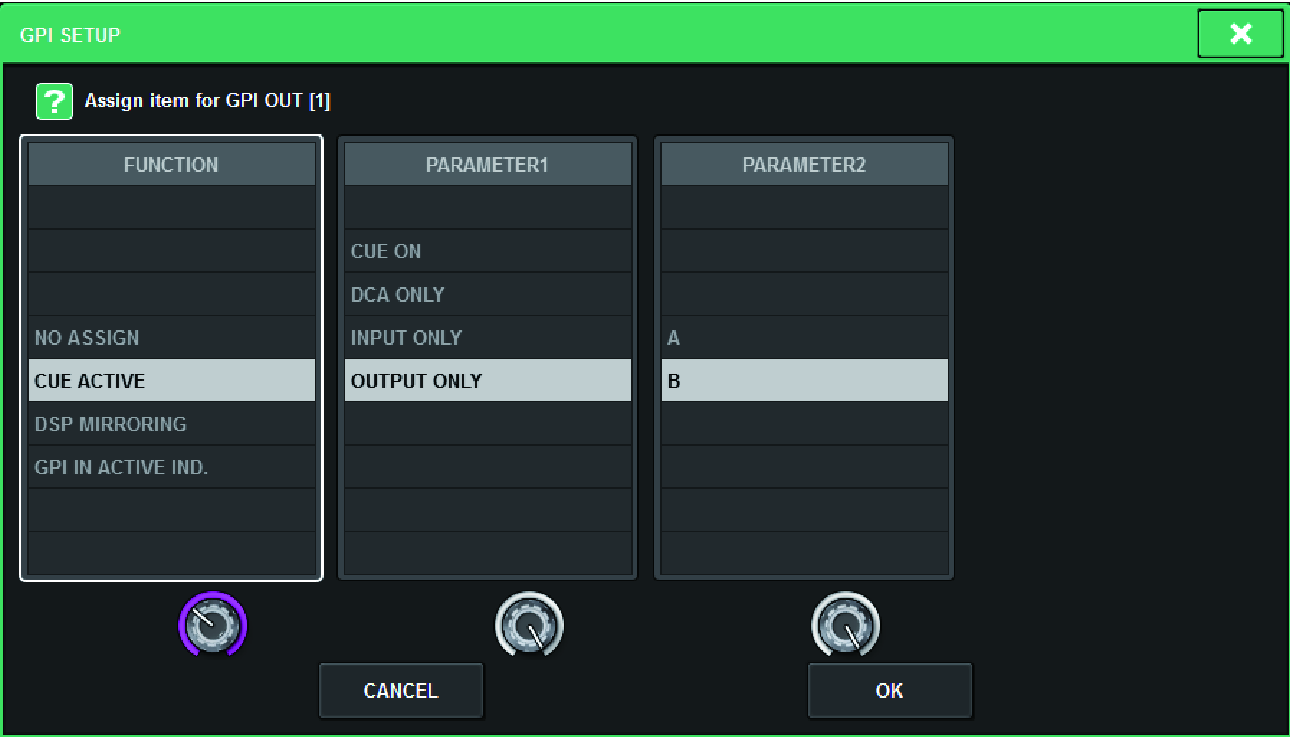
- Configurable “GPI OUT functions”
- In each field, select the desired function or parameter.
- When you finish making settings, press the OK button.
- Repeat steps 5 through 8 to specify functions and parameters for other ports.
 RIVAGE PM Series