


Controlling the SP2016 parameters
The SP2016 Reverb is an authentic recreation of the original rack processor from the Eighties. Highly regarded for its signature reverbs, the SP2016 was used in countless hit records for nearly 40 years. The SP2016 Reverb plug-in includes vintage and modern versions of Room, Stereo Room and Hi-Density Plate. The plug-in naturally captures every aspect of the sound of a real physical environment - from the complex early reflections, to the natural way in which the echo density increases with time, to the smooth Gaussian decay of the reverb tail. The structure of the reverb can be modified by fine-tuning the controls - including PreDelay, Decay, Position and Diffusion. The EQ section allows for simple high and low filtering of the reverb with adjustable filter ranges. The unique Position control takes the listener from the stage to back of the room increasing the early reflections while retaining all other settings.
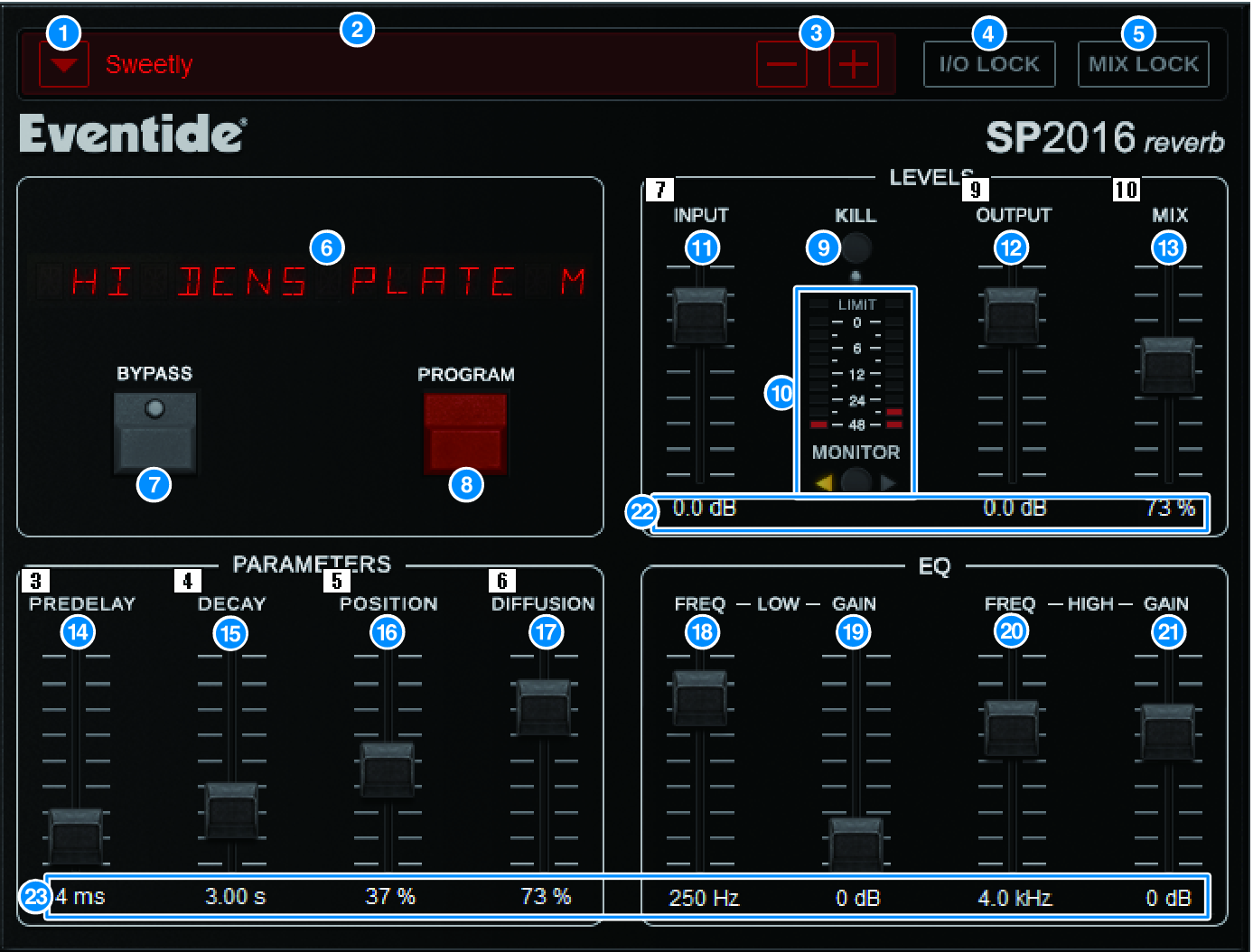
a | PRESET list button Switches the preset. When the preset is switched, the program and other parameters will change accordingly. |
b | PRESET display Indicates the name of the selected preset. |
c | PRESET −/+ buttons The “−” button switches to the previous preset, and the “+” button switches to the following preset. |
d | I/O LOCK button When this button is on, the input/output level will not change when switching between presets. It will be disabled for other operations such as the library recall except for switching between presets. |
e | MIX LOCK button When this button is on, the mix balance will not change when the preset is changed. It will be disabled for other operations such as the library recall except for switching between presets. |
f | LED DISPLAY Displays information for the selected program or parameters that are being modified. |
g | BYPASS button Bypasses the effect. |
h | PROGRAM button Switches between programs (algorithms). |
i | KILL button Shuts off the input (except when bypass is on). |
j | Level meter Displays the input/output level selected using the MONITOR button. The LIMIT LED indicator will light up if the level exceeds 0 dB. Press the LIMIT LED to clear the LED that is lit. The LIMIT LED for the output side is also used for the internal limit indicator of the reverb. |
k | INPUT fader Adjusts the input level. |
l | OUTPUT fader Adjusts the output level. |
m | MIX fader Adjusts the mix balance between dry and wet signals. |
n | PREDELAY fader Adjusts the amount of predelay. |
o | DECAY fader Adjusts the reverberation time. Use caution when LOW GAIN is set to boost (+), as lengthening the DECAY may cause oscillation. |
p | POSITION fader Adjusts the front/rear listening position. |
q | DIFFUSION fader Adjusts the spread of the reverb. |
r | LOW FREQ fader Adjusts the frequency of the low-range EQ (shelving). |
s | LOW GAIN fader Adjusts the gain of the low-range EQ (shelving). Use caution with long DECAY settings, as boosting (+) the LOW GAIN may cause oscillation. |
t | HIGH FREQ fader Adjusts the frequency of the high-range EQ (shelving). |
u | HIGH GAIN fader Adjusts the gain of the high-range EQ (shelving). |
v | Parameter text Indicates the values of the parameters to be operated. Click these values with your mouse to input the values via keyboard. |
w |
 RIVAGE PM Series