


Outputting a control signal to an external device in tandem with scene recall (GPI OUT)
A control signal can be output to an external device connected to the GPI connector of the RIVAGE PM series when you recall a specific scene. Proceed as follows.
NOTE
- For more information about GPI OUT settings, refer to “Using GPI OUT”.
- Press the SCENE field on the menu bar to access the SCENE LIST screen.
- Press the GPI tab at the top of the SCENE LIST screen.
- The “GPI field” appears in the right half of the SCENE LIST screen.
- Press the GPI SET popup button to access the SCENE SETUP (GPI) popup window.
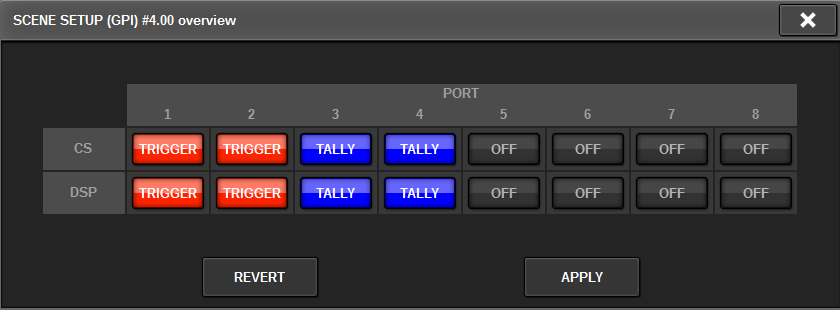
- For each scene, specify the control signal that you want to output to each GPI OUT port.
- Pressing a button repeatedly will switch between the following functions.
- •‒‒‒‒ (OFF).....................Nothing will be output.
- • TRIGGER.....................A trigger will be output when the scene is recalled.
- • TALLY.....................A tally will be output when the scene is recalled.
- When you finish making settings, press the OK button.
- The setting will be finalized, and the popup window will close. If you press the CANCEL button instead of the OK button, your changes will be discarded and the popup window will close.
NOTE
- Scenes for which the GPI settings are made are marked by a “TALLY” or “TRIG” indicator in the GPI PARAMETER display section of the SCENE LIST window (GPI tab).
- Press the GPI button to enable the GPI OUT function.
- You can turn the GPI OUT function on or off individually for each scene.
NOTE
- Scenes for which the GPI button is turned on are marked by a “GPI” indicator in the STATUS field of the SCENE LIST window (COMMENT tab).
- Recall the scene for which you want to output GPI OUT signals.
- When you recall the scene, the control signals will be output to an external device connected to the GPI OUT connector.
 RIVAGE PM Series