
Network
7. Network
This section explains the network specifications and connections of the DME.
7.1. Communication Connectors
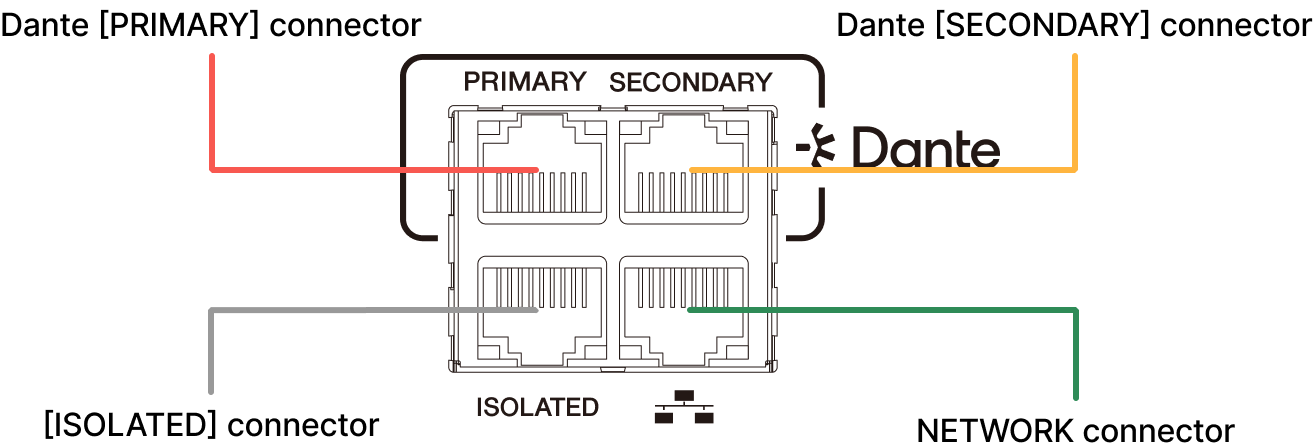
The DME has four communication connectors. For the purpose of each connector, refer to "Rear panel."
 NOTE
NOTE
-
Currently, the ISOLATED connector does not function even if connected (as of device firmware version 3.0.0).
This will be addressed in a future update.
7.2. Network Modes
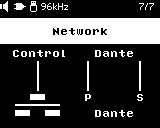
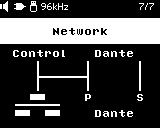
There are two ways to connect a DME to a Dante network: redundant connection and daisy chain connection. Along with the control line setting (Merged/Separated), you can select from four network modes. Use Dante Controller to change the network mode settings.
| When making changes, be careful not to create a network loop. |
|
Control
|
|||
|
Separated
|
Merged
|
||
|
Dante Secondary Port |
Redundant |
1. Redundant
|
2. Redundant
|
|
Daisy Chain |
3. Daisy Chain
|
4. Daisy Chain
|
|
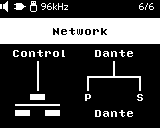
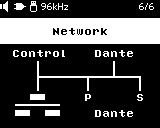
1. Redundant - Control Separated Mode (default value)
|
|
In this mode, the control line, Dante Primary line, and Dante Secondary line are all separate.
|
2. Redundant - Control Merged Mode
|
|
This mode superimposes the control line on the Dante Primary line.
|
3. Daisy Chain - Control Separated Mode
|
|
The control line and Dante line are separate, and Dante is set to daisy chain connection mode.
|
4. Daisy Chain - Control Merged Mode
|
|
This mode superimposes the control line on the Dante line, and Dante is connected in a daisy chain.
|
7.3. About Dante
The DME uses Dante as the protocol for transmitting digital audio signals. Dante is a network audio protocol developed by Audinate. In a Gigabit Ethernet-compatible network environment, it has the advantage of being able to transmit multiple audio signals with different sampling frequencies/bit rates, as well as device control signals, within the same network.
For more information about Dante, visit the Audinate website.
http://www.audinate.com/
Various other information can be found on the Yamaha Pro Audio website.
https://www.yamahaproaudio.com/
NOTE
-
Do not use the EEE function(*) of network switches in a Dante network.
The EEE function may cause poor clock synchronization performance, resulting in audio interruptions.
Therefore, please note the following:-
If you use managed switches, turn off the EEE function of all ports used for Dante traffic. Do not use switches that cannot turn off the EEE function.
-
If you use unmanaged switches, do not use ones that support the EEE function. In such switches, the EEE function cannot be turned off.
* EEE (Energy Efficient Ethernet) function: A technology that reduces the power consumption of Ethernet devices when network traffic is low. It is also known as Green Ethernet or IEEE802.3az.
-
NOTE
-
The DME series, when combined with Yamaha network switches, automatically configures the switch settings for optimal Dante performance.
Setting items: QoS, IGMP snooping, flow control disable, EEE disable, etc.
For details on the switch, refer to below.
https://www.yamaha.com/2/how-to-choose-a-network-switch/
■ Relationship between latency and hop count
The appropriate latency setting for signals sent and received over the Dante audio network differs depending on the connection method and scale. This section explains how to set latency based on the connection status of Dante-enabled devices connected to the DME.
The latency setting for the Dante audio network depends on the hop count in that network.
The hop count is the number of switches between the farthest connections of Dante devices. In addition to switching hubs, switches are also built into the DME and I/O devices. The hop count gives you an idea of the latency you should set. Typical latency settings for various hop counts are shown below.
| Hop count | Latency (ms) |
|---|---|
|
Up to 3 |
0.25 |
|
Up to 5 |
0.5 |
|
Up to 10 |
1.0 |
|
Up to 20 |
2.0 |
|
21 or more
|
5.0 |
7.4. Connection Examples
7.4.1. Redundant connection
Dante’s redundant connections create an environment that is more resistant to network failures than networks built using daisy chains. A redundant connection is a connection method that consists of two lines: a main line (primary) and a sub-line (secondary). Normally, communication is performed over the primary line, but if a problem such as a disconnection occurs on the primary line, communication will automatically switch to the secondary line.
Control Separated
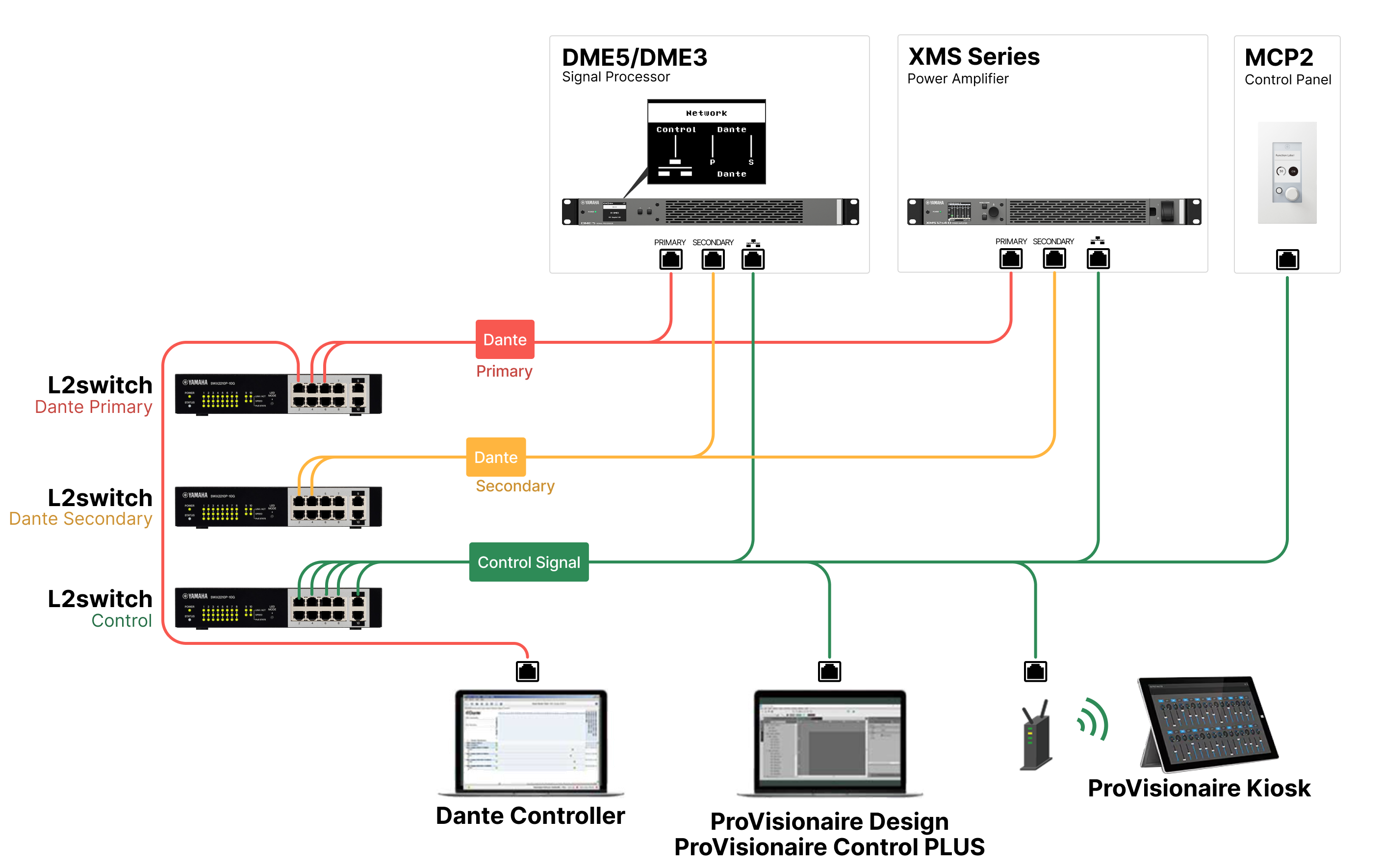
NOTE
-
When building a system like the one shown above, set the DME network mode to "Redundant - Control Separated Mode."
Control Merged
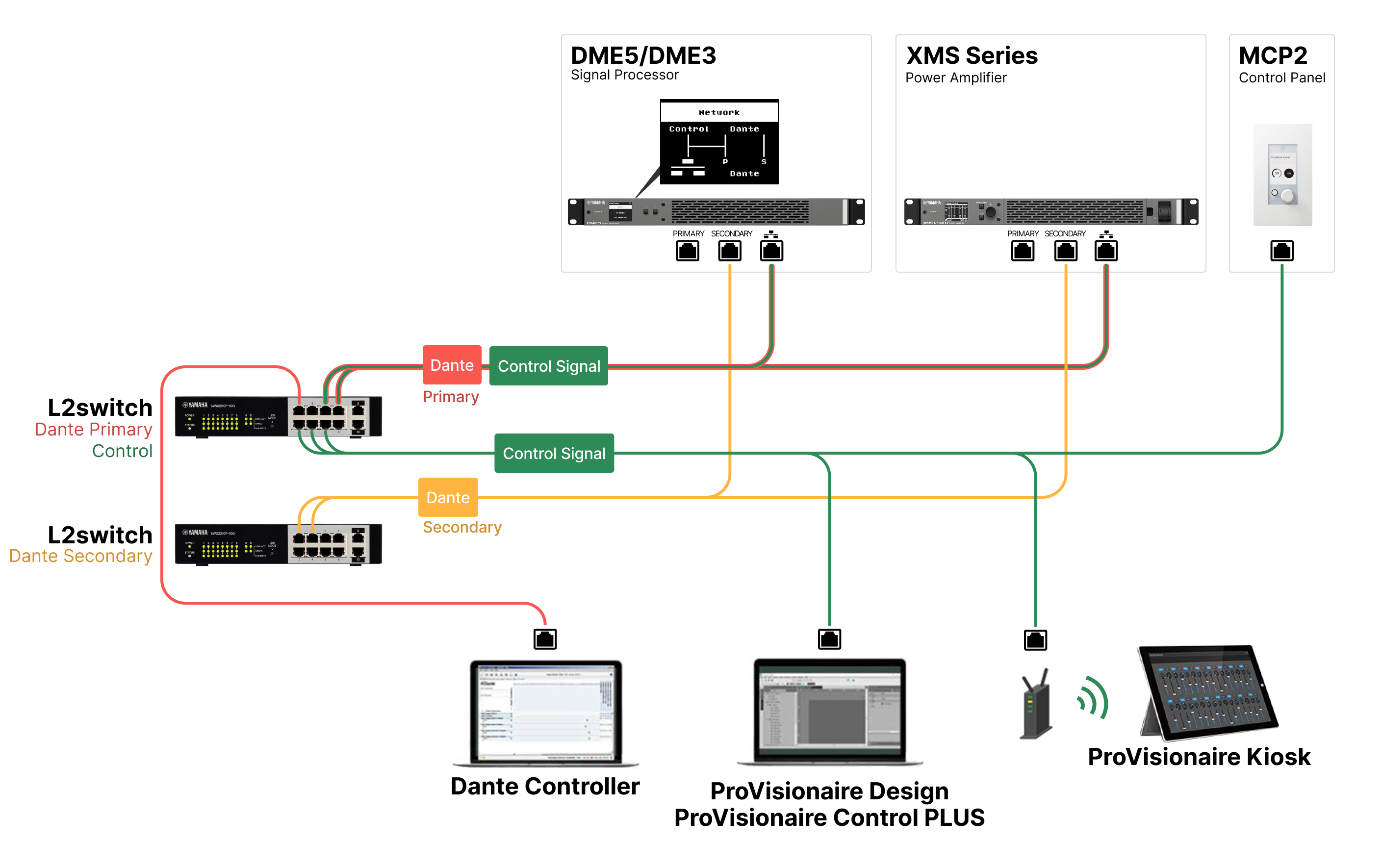
NOTE
-
When building a system like the one shown above, set the DME network mode to "Redundant - Control Merged Mode."
-
If you are running the Dante audio network and a ProVisionaire Design network on the same computer, we recommend using multiple NICs to separate the networks.
7.4.2. Daisy chain connection
Daisy chaining is a method of connecting devices in series. It simplifies network construction and reduces the number of required network switches.
However, as more devices are connected, transmission latency between the devices at the ends of the chain increases. To prevent audio dropouts on the Dante network, you must set a higher Dante latency setting. Additionally, if a cable is disconnected or damaged, the network will be segmented at that point, and communication with downstream devices will be lost.
If the Dante latency is set to its default value (1.0 msec), make sure the number of switches between the two most distant Dante devices does not exceed 10. In addition to switching hubs, switches are also built into the DME and I/O devices. If the number of switches exceeds 10, communication delays within the network will increase and audio dropouts may occur. To avoid this, set the Dante latency to a larger value or use an L2 switch (compatible with Gigabit Ethernet) to split the network.
Control Separated
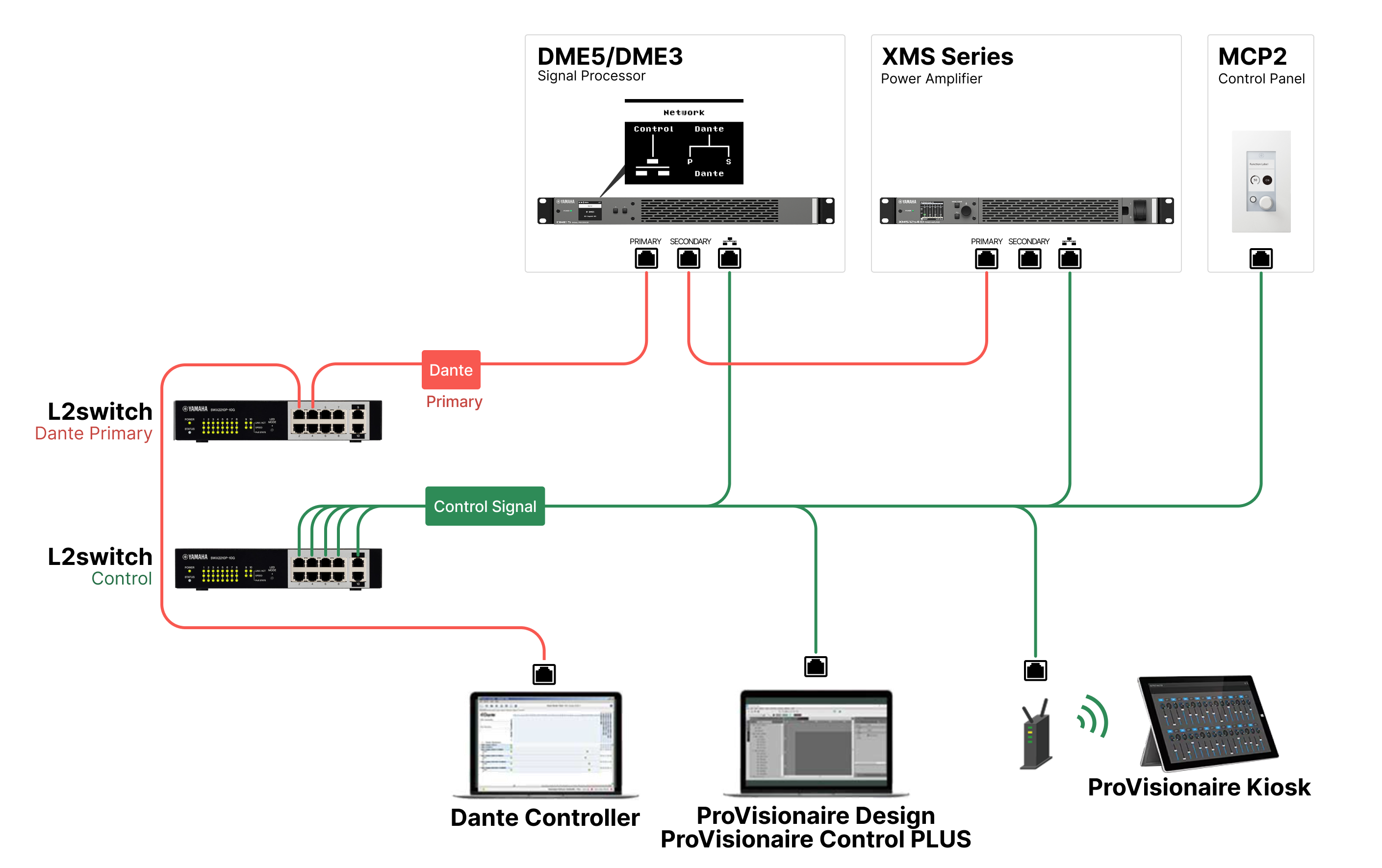
NOTE
-
When building a system like the one shown above, set the DME network mode to "Daisy Chain - Control Separated Mode."
Control Merged
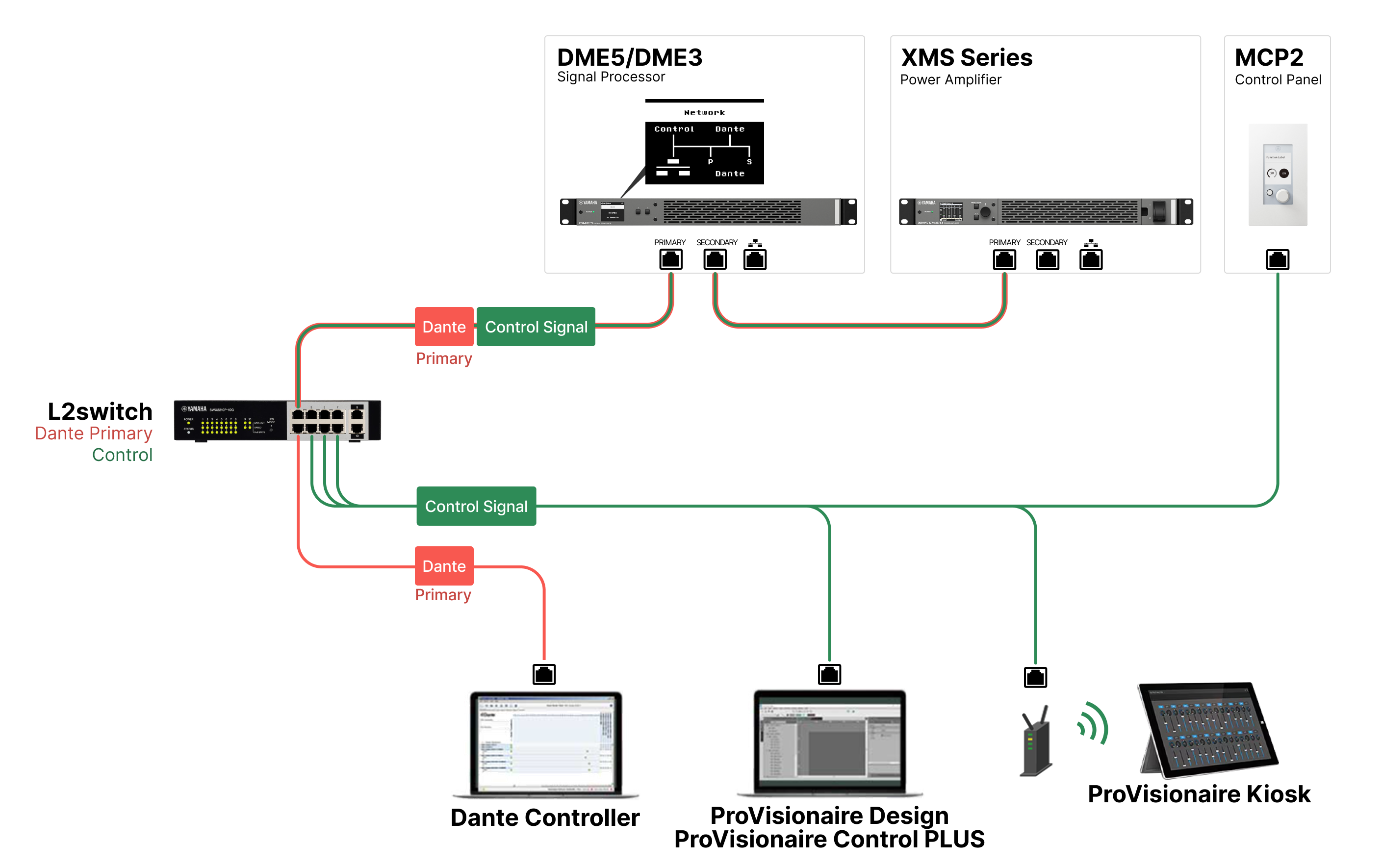
NOTE
-
When building a system like the one shown above, set the DME network mode to "Daisy Chain - Control Merged Mode."
-
Be careful not to create loops in the network.