
Speaker connection screen
5. Speaker connection screen
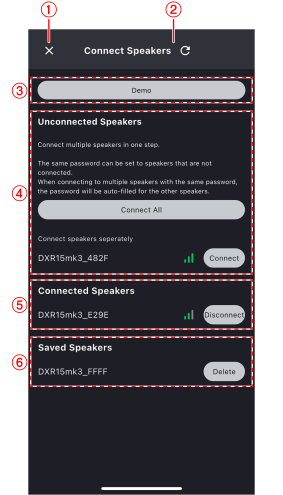
①
 :
Close button
:
Close button
Tap to close the speaker connection screen.
②
 :
Refresh button
:
Refresh button
Tap to search again for connectable speakers.
③
Demo button
Tap to start demo mode.
④
Unconnected speakers
This area displays speakers that are not connected to D-Remote.
To connect D-Remote to the speaker, tap the [Connect] button on the right of the speaker name.
-
Tap the [Connect All] button to display the Connect All screen .
⑤
Connected speakers
This area displays the speakers currently connected.
To disconnect D-Remote and the speaker, tap the [Disconnect] button on the right of the speaker name.
 NOTE
NOTE
If the speaker has been connected before and the password has not been changed, it will connect automatically.
⑥
Saved speakers
This area displays speakers that have been connected before but are currently out of connectable range.
Tap the [Delete] button on the right of the speaker name to remove it from the display.
5.1. Connect All screen
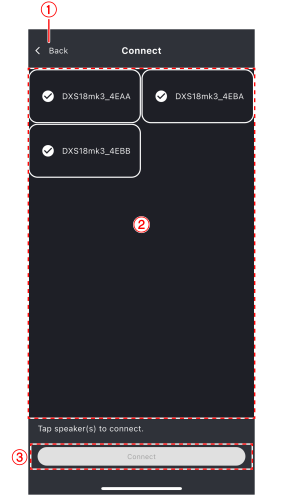
①
Back
Tap to return to the speaker connection screen.
②
Speaker list
This area displays a list of connectable speakers. Tap to select the speaker you want to connect to.
③
Connect
Tap to connect the selected speaker.