
App settings screen
9. App settings screen
This screen displays icon display settings, language settings, license information, version information, other settings for D-Remote.
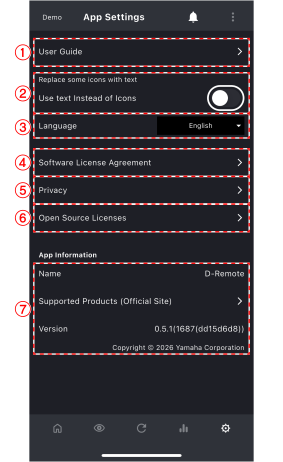
①
User guide
Tap to display the user guide for this app.
②
Use text instead of icons
When this item is enabled, some icons will be replaced with text.
③
[Language setting] list box
Select the language to use in this app.
④
Software license agreement
Tap to display the software license agreement information.
⑤
Privacy
Tap to display the privacy information.
⑥
Open source license
Tap to display information about the open source software licenses used in this app.
⑦
App information
This area displays the version and build number of this app.