
Part names of the sound bar (rear)

This section describes the part names and functions on the rear of the sound bar.
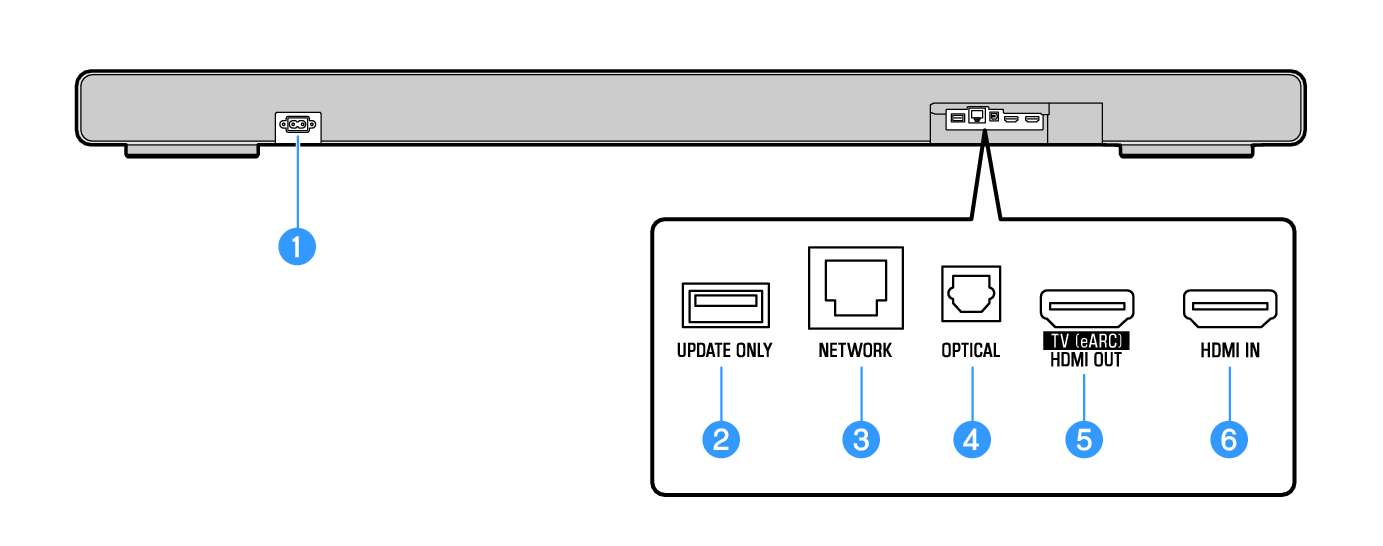
a

AC power input jack

Use to connect the power cord of the sound bar.

b

UPDATE ONLY jack

Use this jack only to update the sound bar’s firmware using a USB flash drive.

See “Firmware Update” for details on how to download and update the firmware.

c

NETWORK jack

Connect a cable to this jack and to connect the sound bar to a network ().

d

OPTICAL jack

If not using the ARC or eARC functions, use an HDMI cable (commercially available) and a digital optical audio cable (commercially available) to connect to the TV ().

The digital optical audio cable transmits the TV’s audio signal to the sound bar.

e

HDMI OUT/TV (eARC) jack

Connect a TV with an HDMI input. Video and audio are output. When using eARC/ARC, audio from the TV is input ().

f

HDMI IN jack

Connect an AV device with an HDMI output. Video and audio are Input ().