
Introduction
1. Introduction
Thank you for purchasing this Yamaha product. This product is a powered speaker designed for versatile sound system applications, such as live performances and fixed installations. This user guide provides detailed explanations of the features and installation instructions. Please read this user guide as needed to fully utilize the various features of this product.
 NOTE
NOTE
-
The example illustrations in this manual show the DXR12mk3 and DXS15mk3, unless otherwise specified.
-
In this manual, the DXR15mk3, DXR12mk3, and DXR10mk3 are all referred to as “DXRmk3.” The DXS18mk3, DXS15mk3, and DXS12mk3 are all referred to as “DXSmk3.”
The DXRmk3 series and DXSmk3 series speakers covered in this manual consist of the following models.
| Model | Type | |
|---|---|---|
|
Full range |
DXR15mk3 |
2-way 15” |
|
DXR12mk3 |
2-way 12” |
|
|
DXR10mk3 |
2-way 10” |
|
|
Subwoofer |
DXS18mk3 |
18” |
|
DXS15mk3 |
15” |
|
|
DXS12mk3 |
12” |
1.1. Symbols used in this manual
The symbols used on this product and in this manual have the following meaning.
| Symbol | Meaning |
|---|---|
|
|
Content describing a situation that might cause death or severe injury. |
|
|
Content describing a situation that might cause injury. |
|
|
Content describing a situation that might cause malfunction, damage, faulty operation, or loss of data. |
|
|
Information regarding operation and use. Read this for your reference. |


1.2. About this manual
-
The illustrations and screens as shown in this manual are for instructional purposes only.
-
QR Code is a registered trademark of DENSO WAVE INCORPORATED.
-
The company names and product names in this manual are the trademarks or registered trademarks of their respective companies.
-
Software may be revised and updated without prior notice.
1.3. Features
■ DXRmk3 series
New acoustic design
-
Bigger horn size expands the frequency range subject to directional control.
-
A large, central port reduces the effects of wind noise and standing waves.
-
Our newly designed proprietary speaker units deliver clear sound with little distortion.
Versatile enclosure design
-
The pole socket has two angles to choose from.
-
The symmetrical design allows mirrored placement when installing floor monitors.
-
Rigging points for eye bolts are equipped. An optional U-bracket enables various installation arrangements.
FIR-X tuning™
The utilization of FIR filters in the crossover realizes smooth phase/frequency response and excellent sound quality.
DSP MODE
The optimal tuning setting can be selected for your application or installation conditions, such as a main speaker or stage monitor.
Mixing function
In addition to line signals, inputs from Bluetooth or microphones can be output.
High reliability
DSP control protects speakers and amplifiers. They can be safely used even in harsh environments.
Bluetooth®< /sup> connection
-
Bluetooth connection allows you to play and control music from your smartphone.
-
The dedicated application software D-Remote can be used to control and monitor the speakers, allowing you to precisely monitor and control the speaker status away from the speaker.
■ DXSmk3 series
High power, high sound pressure, and excellent low-frequency playback capability
The bandpass system adopted has a new shape that is advantageous for high sound pressure. High-power amplifiers and woofers with high input resistance and low distortion are installed, achieving an excellent low-frequency playback capability and high sound pressure.
Excellent functions for optimal sound creation
-
D-XSUB: DSP controls the playback frequency band. You can select settings suitable for a variety of applications and music genres.
-
Selectable X-OVER: Cutoff frequency and LPF/HPF coupling/uncoupling can be selected, allowing for flexible adaptation to a variety of applications.
-
Cardioid mode: This mode allows you to configure a cardioid setting that reduces sound pressure to the rear of the speaker and amplifies sound pressure to the front. (Two or more DXS units are required.)
High reliability
The cabinet is made of sturdy plywood and painted with highly scratch-resistant polyurea resin.
Highly easy to use
A pole socket compatible with both ø35 mm and M20 is also equipped. Optional silent casters can be installed.
Bluetooth®< /sup> connection
-
Bluetooth connection allows you to play and control music from your smartphone.
-
The dedicated application software D-Remote can be used to control and monitor the speakers, allowing you to precisely monitor and control the speaker status away from the speaker.
1.4. Package Contents (Please Verify)
-
Power cord ×1
-
Read This First ×1
1.5. Optional Accessories (Sold Separately)
| Speaker | Speaker Cover | U-Bracket | Wheels |
|---|---|---|---|
|
DXR15mk3 |
SPCVR-DXR153 |
UB-DXR15A |
|
|
DXR12mk3 |
SPCVR-DXR123 |
UB-DXRDHR12A |
|
|
DXR10mk3 |
SPCVR-DXR103 |
UB-DXRDHR10A |
|
|
DXS18mk3 |
SPCVR-DXS183 |
SPW-1 |
|
|
DXS15mk3 |
SPCVR-DXS153 |
SPW-1 |
|
|
DXS12mk3 |
SPCVR-DXS123 |
SPW-1 |
1.6. Available Documentation
-
Read This First (packaged with the product)
This manual explains how to use the product safely. -
User Guide (this manual)
This manual provides detailed explanations of the functions as well as the step-by-step procedures required to install and set up the product. -
D-Remote User Guide
This guide explains how to use D-Remote, the application software that allows you to remotely control this product from a mobile device such as a smartphone or tablet via Bluetooth.
1.7. About Bluetooth® Audio
The DXRmk3 and DXSmk3 series can amplify and distribute audio played on Bluetooth devices such as mobile devices.
This product enables you to search for and pair a Bluetooth device. You can also manually connect from a Bluetooth device that has already been paired.
For details, refer to
UTILITY Screen > BLUETOOTH SETUP
.
1.8. About D-Remote
D-Remote is the application software for remotely controlling this product from a mobile device such as a smartphone or tablet via Bluetooth. You can control the product’s parameters and monitor its operating status.
For instructions on how to download D-Remote, refer to the Yamaha Pro Audio website.
https://www.yamahaproaudio.com/
For details, refer to "D-Remote User Guide."
1.9. Firmware Updates
This product is designed to allow its firmware to be updated to improve operability, add functions, and fix bugs.
You can update the firmware of this product using D-Remote.
For update instructions, refer to "D-Remote User Guide."
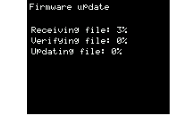
Once the update begins, the progress will be displayed as a percentage on the screen.
Once the update is completed, the results will be displayed and the product will automatically reboot.
NOTE
A firmware update takes an average of 15 minutes. Please allow enough time for the update.
Depending on the signal strength and surrounding environment, the update may not be completed successfully.
In such cases, position your mobile device close to the product when updating it.
If the update still fails, try updating again in a different location or at a different time.