
D-Remote
6. D-Remote
You can control the parameters of multiple speakers and monitor their operating status using a mobile device such as a Bluetooth-enabled smartphone or tablet.
For operational instructions on D-Remote, refer to the "D-Remote User Guide."
6.1. Connecting D-Remote
Connect the mobile device on which D-Remote is installed.
-
Start D-Remote.
-
When the Speaker List screen is displayed, tap the speaker you want to control.
 NOTE
NOTE
If the device you want to connect to does not appear in the list, press the refresh button and search again.
-
Tap [Connect].
The first time you connect the device, a screen requesting connection will be displayed on the screen of the speaker unit.
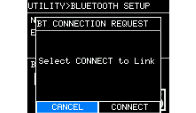
If you select [CONNECT], you can set a password on D-Remote. (The connection cannot be established unless you set one.)
NOTE
The next time you connect a device that has been connected once, steps 2 and 3 will be unnecessary.
6.2. Disconnecting D-Remote
-
Show the Speaker List screen on D-Remote.
-
Tap [Disconnect].