
Functions
2. Functions
2.1. Full-Range Speaker DXRmk3
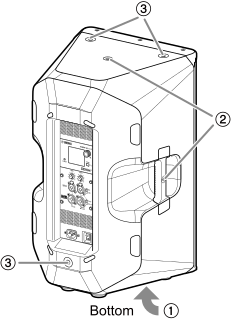
①
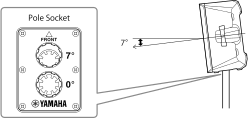
Tiltable pole socket
The pole socket has two holes: one that is level and one at a 7-degree tilt. Use only one of the holes. You can choose to mount the speaker either parallel to the floor or tilted down by 7 degrees. These sockets are compatible with commercially available speaker stands and speaker poles of 35 mm diameter.
②
Screw holes for U-bracket
For installing with separately sold U-brackets.
③
Screw holes for eye bolts
For installing the DXRmk3 using eye bolts. The screw holes for eye bolts go through the cabinet wall.
2.2. Subwoofer DXSmk3
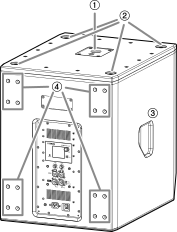
①
Pole socket:
The socket is compatible with both commercially available 35 mm diameter poles and M20 screw-in speaker poles. Choose one mounting method to use.
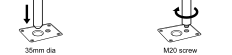
When installing speakers using the pole socket, observe the following conditions for safety.
| Subwoofer | Speaker to be installed | Pole length |
|---|---|---|
|
DXS18mk3 |
Weight: 21.0 kg or less
|
120 cm or less |
|
DXS15mk3 |
Weight: 21.0 kg or less
|
120 cm or less |
|
DXS12mk3 |
Weight: 17.4 kg or less
|
95 cm or less |
|
Weight: 14.5 kg or less
|
120 cm or less |
②
Rubber foot indents
When stacking speakers vertically, align the rubber feet of the top speaker with these indentions.
③ Handle
 CAUTION
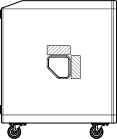
When lifting and carrying the subwoofer, always hold the shaded area of the handle as indicated in the illustration. Holding it anywhere other than the shaded area may cause damage to the subwoofer or physical injury.
④ Caster mounting screws

These screws are for attaching the optional Yamaha Caster SPW-1 (sold separately). Casters can be attached for easier transport. To attach the wheels, use the screws that came attached to the DXSmk3 body. If you do not attach the wheels, do not remove these screws. Otherwise, air leakage will adversely affect sound quality.
CAUTION
Be sure to use this subwoofer along with the optional wheels intended specifically for the Yamaha DXSmk3 series. If you use wheels other than the optional wheels dedicated for the Yamaha DXSmk3 series, the subwoofer may become unstable, increasing the risk of injury.
 NOTE
NOTE
For more information about installing wheels and related precautions, refer to the corresponding manual for the wheels.
2.3. Rear Panel (Full Range, Subwoofer)
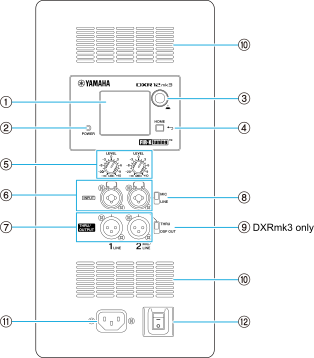
The illustration is from the DXR12mk3.
①
Color display
Displays the setting status of various functions. You can graphically fine-tune EQ, delay, routing, and more. A backlight is provided, allowing you to set the brightness and auto-turn off (
AUTO DIMMER
) of the display.
②
[POWER] indicator
Lights up green when the power is on. Also, if a serious system error is detected when this product is started up, the indicator will flash (at this time, FATAL ERROR will be displayed on the HOME screen).
NOTE
The [POWER] indicator does not completely turn off even when AUTO DIMMER is ON.
③
Main knob
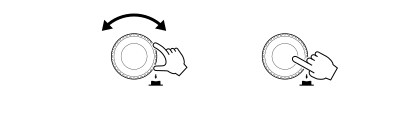
Turn the main knob to move the cursor on the display or change parameter values. Press the main knob for confirmation.
④
[
 ] (Back) key
Press this button to move to the previous screen. Press and hold this button for more than one second to return to the HOME screen.
⑤
[LEVEL] control
You can adjust the level input to each [INPUT] connector.
⑥
[INPUT] connector
This is a line-level combo input connector. It supports both XLR and phone connectors. Two input signals can be mixed with separate level adjustments.
⑦
[THRU/OUTPUT] connector
This is an XLR type output connector. For channel 2 on the DXRmk3 series and channels 1 and 2 on the DXSmk3 series, the output signals can be switched using the ⑨ [THRU/DSP OUT] switch. Channel 1 on the DXRmk3 series is fixed to [THRU].
<DXRmk3 series>

<DXSmk3 series>

⑧
[MIC/LINE] switch (only for the DXRmk3 series)
You can switch the mode according to the input level to channel 2. Set this switch to [MIC] when connecting a low-level device such as a microphone, and to [LINE] when connecting a high-level device such as a mixer. By default, when you switch to [MIC], the HPF is automatically enabled.
⑨
[THRU/DSP OUT] switch
You can switch the signals output from the output connector between the signals [THRU] that are directly passed through from the input connector, or the signals [DSP OUT] that are processed by DSP. If you set the switch to [DSP OUT], you can also set the output signals. For information about the signals that can be output, refer to
UTILITY Screen > LINK MODE
.
⑩
Ventilation holes
A cooling fan is installed on the exhaust side of the ventilation holes. The fan starts spinning when the amplifier temperature exceeds a preset value. The fan speed is controlled based on the temperature of the amplifier and power supply.
CAUTION
Do not block the ventilation holes (heat dissipation slits) of this product. This product has ventilation holes on the back to prevent internal temperature rise. If the ventilation holes are blocked, heat may build up inside the product, which may result in malfunction or fire.
⑪
[AC IN] socket
Connect the included power cord in the following order: Before connecting the power cord, make sure the product is turned off.
-
Connect the plug of the included power cord to the AC IN socket on the rear panel of the unit. Insert the power plug all the way in until the latch locking mechanism (V-lock) locks.
-
Connect the other end of the power cord to a power outlet (AC 100 V).
NOTE
-
To remove the power cord, follow the above steps in reverse.
-
Remove the power plug while pressing the V-lock latch.
WARNING
-
Be sure to use the power cord supplied with the product. Using any other power cord may result in overheating or electric shock.
CAUTION
Always turn off the power before connecting or disconnecting the power cord.
⑫
Power switch
Use this switch to turn the power of the unit on (-) and off (○).
CAUTION
Even when the power switch is turned off, a small amount of current still flows. Be sure to unplug the power cord from the power outlet when this product is not used for an extended period of time.
 NOTICE
-
Rapidly turning the power switch on and off in succession may cause malfunction. After turning the power switch off, wait at least 6 seconds before turning it on again.
-
If you are using multiple units, turn them on one by one. If multiple units are turned on at the same time, the units may not properly start up due to a drop in power supply voltage or other reasons.