
Basic Operations
6. Basic Operations
6.1. Panel Operations
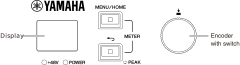
You can use the front panel display, [MENU/HOME] key, [
 ] (Back) / [PEAK] key, and the encoder with switch to set the various parameters.
Refer to the table below for information on basic operation.
|
Selecting an item |
|
||
|
Confirming the setting |
|
||
|
Displaying the previous screen |
|


6.2. Error Display
6.2.1. Error popup screens
An error popup screen is displayed when an error occurs.

In addition, it is displayed when you select and confirm the ERROR icon (
 ) on the home screen.
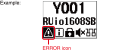
When an error pop-up screen is displayed, press the encoder with switch or the [
] (Back) / [PEAK] key to return to the previous screen.
For a list of error messages, refer to “ Message List ”.