


Names of parts and functions on the front display
This section describes the names and functions of the parts of the front display.
Normal display
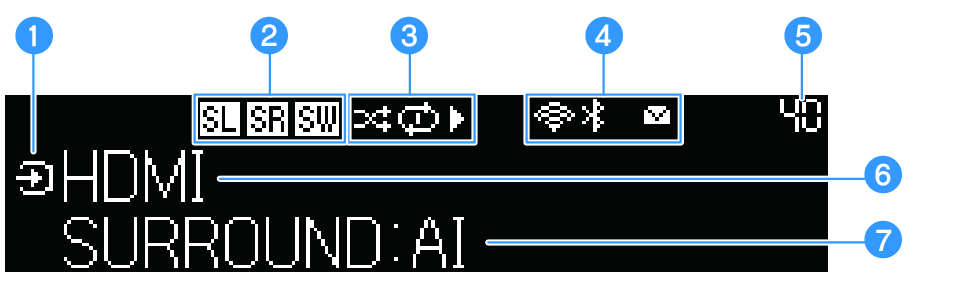
a | Mode icon Displays the modes (input display, information screen selection) of the front display.
|
 : Glows when in input display mode.
 : Glows when in information screen selection mode.
b | Icons indicating connected speaker The following icons glow when surround speakers or a subwoofer is connected.
The following icons glow when the surround speakers and subwoofer connected to the sound bar are turned off. Glows only when the surround speakers or subwoofer are connected to power.
|
 : Glows when the left surround speaker is connected.
 : Glows when the right surround speaker is connected.
 : Glows when only one surround speaker is connected.
 : Glows when a subwoofer is connected.
 : Glows when the left of the connected surround speakers is turned off.
 : Glows when the right of the connected surround speakers is turned off.
 : Glows when only one of the connected surround speakers is turned off.
 : Glows when a connect subwoofer for some reason is turned off. When this icon glows, disconnect the power plug of the subwoofer momentarily before reconnecting it to check that it is connected to the sound bar.
c | Playback status icons
|
 : Glows when Shuffle playback is selected.
 : Glows when Repeat (All Tracks) playback is selected.
 : Glows when Repeat (1 Track) playback is selected.
 : Glows during playback.
 : Glows when playback is paused.
 : Glows when playback is stopped.
d | Status icons
|
 (Wireless LAN): Glows when connected to a wireless network. Flashing starts while WAC* and MusicCast network are in registration mode.
 (Bluetooth): Glows when a Bluetooth device is connected.
 : Glows when a firmware update has become available.
e | Volume Displays the volume. |
f | Main information display area Displays the name of the current input, the name of the display item of input information, etc. depending on the display mode of the front display. |
g | Additional information display area Displays additional input information (sound mode name, output channel information, etc.). |
Menu display
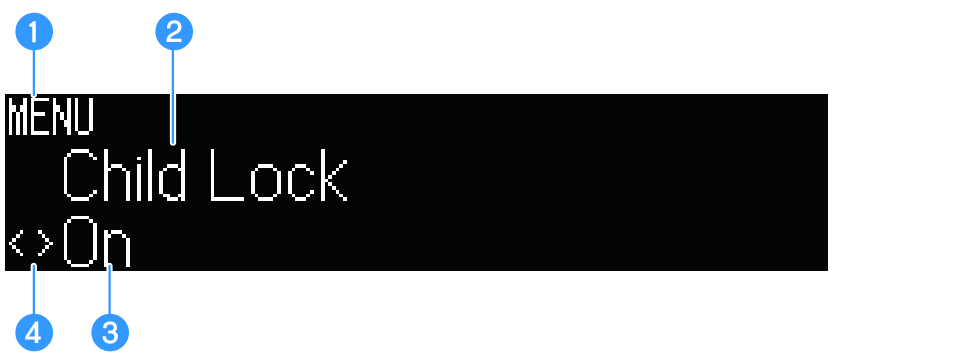
a | Menu mode Glows when the front display menu is opened. |
b | Menu level Displays the name of the current level of the hierarchical front display menu. |
c | Menu item Displays front display menu item or set value. |
d | Cursor indicator Displays cursor operations of right menu items or set values. |
- The front display example shown here is an English screen.
 TRUE X BAR 90A (SR-X90A)