
AMP PRESET screen
7. AMP PRESET screen
You can recall sound-related settings as an amplifier preset, and save, delete, edit the title, or set protection. Recall-only presets are always protected.
When you change a parameter, the
 symbol will appear on the HOME screen.
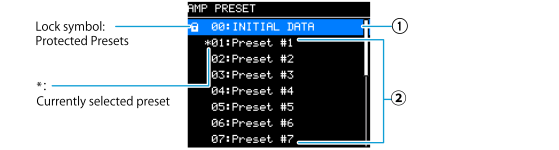
①
INITIAL DATA
Returns to the default settings. This preset is for recall-only.
②
USER PRESET 1-16
Up to 16 user presets can be saved on the main unit. You can recall a user preset you saved, delete it, edit its title, and set protection. A lock symbol appears for the protected amplifier presets.
 WARNING
For safety reasons, do not input any sound when recalling an amplifier preset. The volume may significantly change.
● Select the preset you want to operate. A screen for selecting an operation will be displayed.
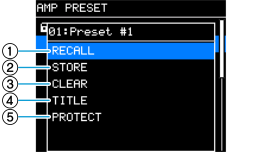
①
RECALL
Recalls a saved amplifier preset.
The selected preset number and title are displayed.
②
STORE
Saves the current amplifier settings as an amplifier preset with a given title.
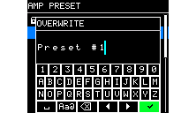
Once the preset is saved, “EXECUTED!” will be displayed.Press [OK] to return to the PRESET list screen. If it is not saved, “FAULT” will be displayed. You cannot overwrite a protected amplifier preset.
③
CLEAR
Deletes saved amplifier presets.
You cannot delete protected amplifier presets.
④
TITLE
Edit the title of the saved amplifier preset.
Once the preset is saved, “EXECUTED!” will be displayed. Press OK to return to the AMP PRESET list screen. If it is not saved, “FAULT” will be displayed. You cannot edit the title of a protected amplifier preset.
⑤
PROTECT
Enables or disables protection on saved amplifier presets.
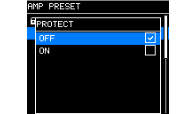
When this item is set to ON, amplifier presets cannot be overwritten (STORE), deleted (CLEAR), or their titles cannot be edited (TITLE). Additionally, a lock symbol appears to the left of the preset title on the AMP PRESET screen.