
MAINTENANCE screen
12. MAINTENANCE screen
You can enter maintenance mode by pressing the shortcut key at startup, and perform initialization and clear the current memory.
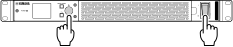
To display the MAINTENANCE screen, turn on the power switch while holding down the main knob. Alternatively, you can also display the MAINTENANCE screen by turning on the power switch and pressing the main knob while the product logo is displayed.
①
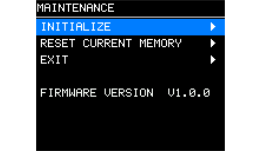
INITIALIZE
Initializes the device. For the operation method, refer to “Restoring to factory default settings (Initialization)” → “
Initializing from the MAINTENANCE screen
.”
②
RESET CURRENT MEMORY
Resets only the current memory to the default settings.
Once selected, a confirmation screen will appear. Select [OK].
③
EXIT
When you select this item, a confirmation screen will appear. Select [YES] to return to the HOME screen.
④
Firmware version
Displays the firmware version.