
Restoring to factory default settings (Initialization)
13. Restoring to factory default settings (Initialization)
You can initialize the main unit from the MENU screen or the MAINTENANCE screen. If you cannot select INITIALIZE on the MENU screen because you have forgotten the PIN code set for panel lock or other reasons, initialize the main unit from the MAINTENANCE screen.
13.1. Initializing from the MENU screen
-
Press the [MENU/HOME] button.

The MENU screen will appear on the display.
-
Select and confirm [UTILITY] → [INITIALIZE] to open the INITIALIZE screen.
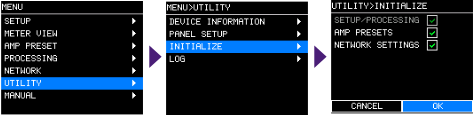
Select the items to be initialized (multiple selections possible).
SETUP/PROCESSING
PROCESSING, SETUP, UTILITY
AMP PRESET
AMP PRESET
NETWORK
IP SETTING, Dante SETTINGS, UNIT ID
*SETUP/PROCESSING is always subject to initialization.
-
Press [OK] on the confirmation message to confirm the initialization.
Once initialization is completed, the main unit will automatically restart and then enter the power-on state.
13.2. Initializing from the MAINTENANCE screen
If you forget your PIN code, you can initialize the unit from this screen.
-
While holding down the main knob, turn on the power switch.
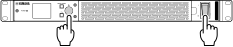
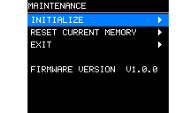
The MAINTENANCE screen will appear on the display.
-
Select and confirm [INITIALIZE] to open the INITIALIZE screen.
-
Select the initialization method.
RESET ALL
Restores to the factory default settings.
KEEP NETWORK SETTINGS
Initializes all settings except for NETWORK settings.
KEEP AMP PRESET
Initializes all settings except for the AMP PRESET.
KEEP NETWORK/AMP PRESET
Initializes all settings except for NETWORK settings and AMP PRESET.
-
Press [OK] on the confirmation message to confirm the initialization.
Once initialization is completed, the main unit will automatically restart and then enter the power-on state.
13.3. Initializing the PIN code
If you forget your PIN code, you can unlock the panel by performing initialization on the MAINTENANCE screen. Refer to “Restoring to factory default settings (Initialization)” - “ Initializing from the MAINTENANCE screen .”
 NOTE
NOTE
The factory default PIN code is 0000.
13.4. Unlocking the panel
If you try to operate the panel while it is locked, the following message will appear on the screen.
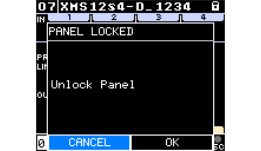
Turn the main knob to select OK, and press it to confirm.